Adding Material Design AlertDialog to your app using Appcompat
suggest changeAlertDialog is a subclass of Dialog that can display one, two or three buttons. If you only want to display a String in this dialog box, use the setMessage() method.
The AlertDialog from android.app package displays differently on different Android OS Versions.
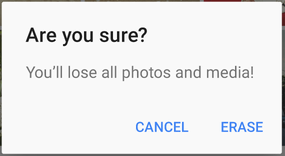
The Android V7 Appcompat library provides an AlertDialog implementation which will display with Material Design on all supported Android OS versions, as shown below:
First add the v7 AppCompat library in the app module’s build.gradle:
dependencies {
    compile 'com.android.support:appcompat-v7:24.2.1'
    //........
}
Be sure to import the correct class:
import android.support.v7.app.AlertDialog;
Then create the dialog:
AlertDialog.Builder builder = new AlertDialog.Builder(this);
builder.setTitle("Are you sure?");
builder.setMessage("You'll lose all photos and media!");
builder.setPositiveButton("ERASE", null);
builder.setNegativeButton("CANCEL", null);
builder.show();
Found a mistake? Have a question or improvement idea?
Let me know.
Table Of Contents