Common memory leaks and how to fix them
suggest change1. Fix your contexts:
Use a Context that matches the object's lifetime. A Toast is not tied to one activity, so getApplicationContext() is a safe choice. A service can keep running after the activity ends, so start it with the application context:
Intent myService = new Intent(getApplicationContext(), MyService.class);
Use this table as a quick guide for what context is appropriate:
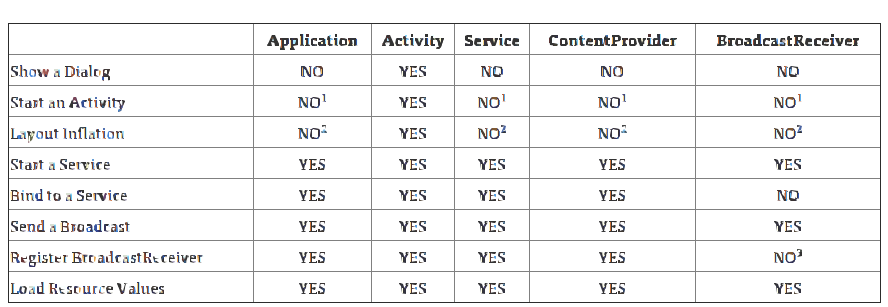
Original article on context here.
2. Static reference to Context
A static reference to a View leaks the activity. Every View holds its Context, so the old activity and its view hierarchy stay in memory until the process dies. After rotation you can have two copies of that activity.
Do not keep a static reference to a View, a Context, or any object that reaches them.
3. Check that you are actually finishing your services.
An IntentService that uses the Google location API still needs googleApiClient.disconnect():
//Disconnect from API onDestroy()
if (googleApiClient.isConnected()) {
    LocationServices.FusedLocationApi.removeLocationUpdates(googleApiClient, GoogleLocationService.this);
    googleApiClient.disconnect();
}
4. Check image and bitmap usage:
With Picasso, .fit() decodes the bitmap to the ImageView size. Skipping it keeps the full-size bitmap in memory. In one case that dropped usage from about 50 MB to under 19 MB:
Picasso.with(ActivityExample.this)                   //Activity context
                .load(object.getImageUrl())
                .fit()                                //This avoided the OutOfMemoryError
                .centerCrop()                         //makes image to not stretch
                .into(imageView);
5. If you are using broadcast receivers unregister them.
If you registered a receiver with registerReceiver, call unregisterReceiver with that same receiver from the matching teardown method (onPause or onDestroy). A leaked registration keeps the activity that created the receiver.
6. If you are using java.util.Observer (Observer pattern):
Call deleteObserver(observer) on the Observable when the observer should stop receiving events. Otherwise the Observable keeps the observer, and the observer often keeps an activity.