Customization of BottomNavigationView
suggest changeNote : I am assuming that you know about how to use BottomNavigationView.
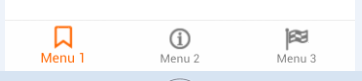
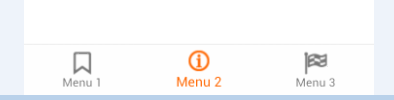
This example adds a color selector for BottomNavigationView, so the icons and text can show a selected state.
itemIconTint and itemTextColor take a color list. Create res/color/bottom_navigation_view_selector.xml:
<?xml version="1.0" encoding="utf-8"?>
<selector xmlns:android="http://schemas.android.com/apk/res/android">
    <item  android:color="@color/bottom_nv_menu_selected" android:state_checked="true" />
    <item android:color="@color/bottom_nv_menu_default" />
</selector>
And use below attributes into BottomNavigationView in layout file
app:itemIconTint="@color/bottom_navigation_view_selector"
app:itemTextColor="@color/bottom_navigation_view_selector"
In above example, I have used same selector bottom_navigation_view_selector for app:itemIconTint and app:itemTextColor both to keep text and icon colors same. But if your design has different color for text and icon, you can define 2 different selectors and use them.
Output will be similar to below
Found a mistake? Have a question or improvement idea?
Let me know.
Table Of Contents