How to vary between child and parent view group touch events
suggest change- Touch events for nested view groups can be managed by the
booleanonInterceptTouchEvent.
The default implementation of onInterceptTouchEvent returns false.
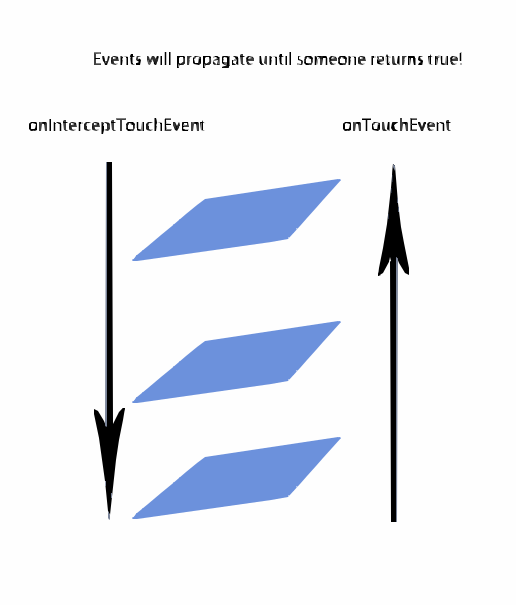
The parent’s onInterceptTouchEvent runs before the child’s onTouchEvent. If onInterceptTouchEvent returns false, the motion event goes down the chain to the child’s onTouchEvent. If it returns true, the parent handles the touch event.
However there may be instances when we want some child elements to manage onTouchEvents and some to be managed by the parent view (or possibly the parent of the parent).
This can be managed in more than one way.
- One way a child element can be protected from the parent’s
onInterceptTouchEventis by implementing the requestDisallowInterceptTouchEvent.
public void requestDisallowInterceptTouchEvent (boolean disallowIntercept)
This prevents any of the parent views from managing onTouchEvent for this element, if the element has event handlers enabled.
If onInterceptTouchEvent returns false, the child element’s onTouchEvent will be evaluated. If you have methods within the child elements handling the various touch events, any related event handlers that are disabled pass the event back to the parent.
A visualisation of how the propagation of touch events passes through:
parent -> child|parent -> child|parent -> child views.
- Another way is returning varying values from
onInterceptTouchEventfor the parent.
This example taken from Managing Touch Events in a ViewGroup and demonstrates how to intercept the child’s onTouchEvent when the user is scrolling.
4a.
@Override
public boolean onInterceptTouchEvent(MotionEvent ev) {
    /*
     * This method JUST determines whether we want to intercept the motion.
     * If we return true, onTouchEvent will be called and we do the actual
     * scrolling there.
     */
final int action = MotionEventCompat.getActionMasked(ev);

// Always handle the case of the touch gesture being complete.
if (action == MotionEvent.ACTION_CANCEL || action == MotionEvent.ACTION_UP) {
    // Release the scroll.
    mIsScrolling = false;
    return false; // Do not intercept touch event, let the child handle it
}

switch (action) {
    case MotionEvent.ACTION_MOVE: {
        if (mIsScrolling) {
            // We're currently scrolling, so yes, intercept the
            // touch event!
            return true;
        }

        // If the user has dragged her finger horizontally more than
        // the touch slop, start the scroll

        // left as an exercise for the reader
        final int xDiff = calculateDistanceX(ev);

        // Touch slop should be calculated using ViewConfiguration
        // constants.
        if (xDiff > mTouchSlop) {
            // Start scrolling!
            mIsScrolling = true;
            return true;
        }
        break;
    }
    ...
}

// In general, we don't want to intercept touch events. They should be
// handled by the child view.
return false;
}
This is some code from the same link showing how to create the parameters of the rectangle around your element:
4b.
// The hit rectangle for the ImageButton
myButton.getHitRect(delegateArea);

// Extend the touch area of the ImageButton beyond its bounds
// on the right and bottom.
delegateArea.right += 100;
delegateArea.bottom += 100;

// Instantiate a TouchDelegate.
// "delegateArea" is the bounds in local coordinates of
// the containing view to be mapped to the delegate view.
// "myButton" is the child view that should receive motion
// events.
TouchDelegate touchDelegate = new TouchDelegate(delegateArea, myButton);

// Sets the TouchDelegate on the parent view, such that touches
// within the touch delegate bounds are routed to the child.
if (View.class.isInstance(myButton.getParent())) {
    ((View) myButton.getParent()).setTouchDelegate(touchDelegate);
}