Import audio into androidstudio and play it
suggest changeThis is an example of how to play an audio file which you already have on your pc/laptop. First create a new directory under res and name it raw, like this
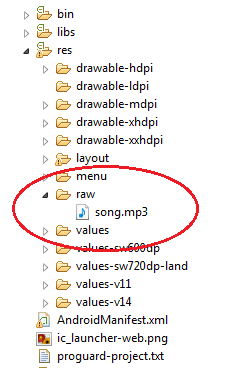
copy the audio which you want to play into this folder. It may be a .mp3 or .wav file.
Now, for example, on a button click you want to play this sound. Here is how it is done
public class MainActivity extends AppCompatActivity {
@Override
public void onCreate(Bundle savedInstanceState) {
    super.onCreate(savedInstanceState);
    setContentView(R.layout.aboutapp_activity);

    MediaPlayer song=MediaPlayer.create(this, R.raw.song);

    Button button=(Button)findViewById(R.id.button);
    button.setOnClickListener(new View.OnClickListener() {
        @Override
        public void onClick(View view) {
           song.start();
        }
    });
}
}
Calling start() while the player is already playing does not restart the clip. After playback completes, start() plays it again from the beginning. To restart in the middle of playback, release the player and create it again. song is a field here, because the click listener assigns it:
public class MainActivity extends AppCompatActivity {
    private MediaPlayer song;

    @Override
    public void onCreate(Bundle savedInstanceState) {
        super.onCreate(savedInstanceState);
        setContentView(R.layout.aboutapp_activity);

        song = MediaPlayer.create(this, R.raw.song);

        Button button = (Button) findViewById(R.id.button);
        button.setOnClickListener(new View.OnClickListener() {
            @Override
            public void onClick(View view) {
                if (song.isPlaying()) {
                    song.release();
                    song = MediaPlayer.create(getApplicationContext(), R.raw.song);
                }
                song.start();
            }
        });
    }
}
Found a mistake? Have a question or improvement idea?
Let me know.
Table Of Contents