Set custom notification - show full content text
suggest changeIf you want a long text in the notification, you need a custom style. On Android 8.0 and higher this notification also needs a channel id.
For example, you have this:

But you want the text to be fully shown:
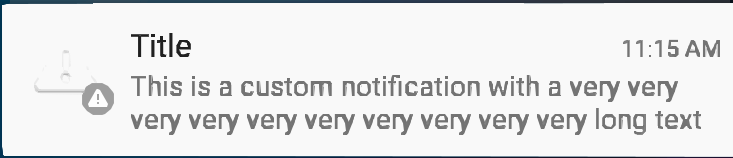
All you need to do is add a style to your content, like below:
private void generateNotification(Context context) {
      String message = "This is a custom notification with a very very very very very very very very very very long text";
      Bitmap largeIcon = BitmapFactory.decodeResource(context.getResources(), android.R.drawable.ic_dialog_alert);

      NotificationCompat.Builder builder = new NotificationCompat.Builder(context);

      builder.setContentTitle("Title").setContentText(message)
              .setSmallIcon(android.R.drawable.ic_dialog_alert)
              .setLargeIcon(largeIcon)
              .setAutoCancel(true)
              .setWhen(System.currentTimeMillis())
              .setStyle(new NotificationCompat.BigTextStyle().bigText(message));

      Notification notification = builder.build();
      NotificationManagerCompat notificationManager = NotificationManagerCompat.from(context);
      notificationManager.notify(101, notification);
  }
Found a mistake? Have a question or improvement idea?
Let me know.
Table Of Contents