Writing more complex tests using the UIAutomatorViewer
suggest changeIn order to enable writing more complex UI tests the UIAutomatorViewer is needed. The tool located at /tools/ makes a fullscreen screenshot including the layouts of the currently displayed views. See the subsequent picture to get an idea of what is shown:
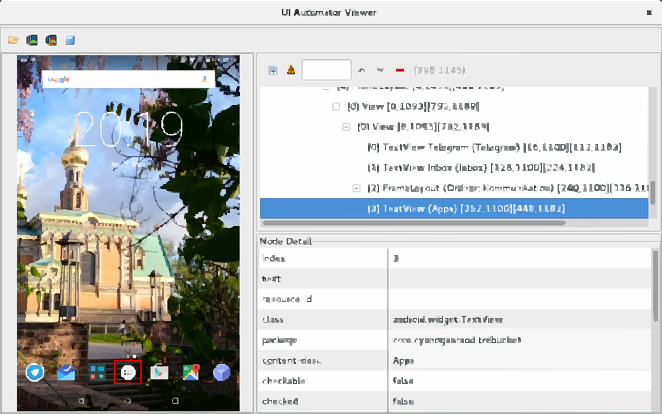
For the UI tests we are looking for resource-id, content-desc or something else to identify a view and use it inside our tests.
The uiautomatorviewer is executed via terminal.
If, for instance, you want to click the applications button, open an app, and swipe, the test method can look like this:
public void testOpenMyApp() throws Exception {
    // wake up your device
    device.wakeUp();

    // switch to launcher (hide the previous application, if some is opened)
    device.pressHome();

    // enter applications menu (timeout=200ms)
    device.wait(Until.hasObject(By.desc(("Apps"))), 200);
    UiObject2 appsButton = device.findObject(By.desc(("Apps")));
    assertNotNull(appsButton);
    appsButton.click();

    // enter some application (timeout=200ms)
    device.wait(Until.hasObject(By.desc(("MyApplication"))), 200);
    UiObject2 someAppIcon = device.findObject(By.desc(("MyApplication")));
    assertNotNull(someAppIcon);
    someAppIcon.click();

    // do a swipe (steps=20 is 0.1 sec.)
    device.swipe(200, 1200, 1300, 1200, 20);
    assertTrue(isSomeConditionTrue);
}
Found a mistake? Have a question or improvement idea?
Let me know.
Table Of Contents