Asynchronous socket client and server example
suggest changeServer Side example
Create Listener for server
Start by creating a server that handles clients that connect and requests that are sent. The listener class below does that.
class Listener
{
    public Socket ListenerSocket; //This is the socket that will listen to any incoming connections
    public short Port = 1234; // on this port we will listen

    public Listener()
    {
        ListenerSocket = new Socket(AddressFamily.InterNetwork, SocketType.Stream, ProtocolType.Tcp);
    }
 }
Initialize the listener socket that accepts connections. This example uses a TCP socket, so the socket type is SocketType.Stream. Also choose the port the server listens on.
Then start listening for incoming connections.
The three methods used here are:
This method binds the socket to an IPEndPoint. This class contains the host and local or remote port information needed by an application to connect to a service on a host.
The backlog parameter specifies the number of incoming connections that can be queued for acceptance.
The server starts listening for incoming connections and can run other logic in the meantime. When a connection arrives, the runtime calls AcceptCallback.
public void StartListening()
    {
        try
        {
                MessageBox.Show($"Listening started port:{Port} protocol type: {ProtocolType.Tcp}");
                ListenerSocket.Bind(new IPEndPoint(IPAddress.Any, Port));
                ListenerSocket.Listen(10);
                ListenerSocket.BeginAccept(AcceptCallback, ListenerSocket);
        }
        catch(Exception ex)
        {
            throw new Exception("listening error", ex);
        }
    }
So when a client connects we can accept them by this method:
Three methods we use here are:
The callback was started with BeginAccept, and EndAccept finishes that operation. EndAccept takes an IAsyncResult that holds the state of the asynchronous call. From that state you get the socket for the incoming connection.
ClientController.AddClient()
With the socket from EndAccept, create a client with ClientController.AddClient (see ClientController below).
Start listening again after the new connection is accepted. Pass the callback method, and pass the listener socket so the same socket is reused for later connections.
public void AcceptCallback(IAsyncResult ar)
{
    try
    {
        Console.WriteLine($"Accept CallBack port:{Port} protocol type: {ProtocolType.Tcp}");
        Socket acceptedSocket = ListenerSocket.EndAccept(ar);
        ClientController.AddClient(acceptedSocket);

        ListenerSocket.BeginAccept(AcceptCallback, ListenerSocket);
    }
    catch (Exception ex)
    {
        throw new Exception("Base Accept error", ex);
    }
}
The listening socket is in place. The next code receives data sent by the client.
Create Server Receiver for each client
First create a receive class whose constructor takes a Socket:
public class ReceivePacket
{
    private byte[] _buffer;
    private Socket _receiveSocket;

    public ReceivePacket(Socket receiveSocket)
    {
       _receiveSocket = receiveSocket;
    }
}
The next method sizes the buffer to 4 bytes (Int32). A packet has two parts: {length, actual data}. The first 4 bytes are the length of the payload; the rest is the payload. BeginReceive may return fewer bytes than requested, and this sample assumes the 4-byte length arrives in one receive. Encoding.Default is not always one byte per character, so the length must be the byte count, not string.Length.
Next we use BeginReceive() method. This method is used to start receiving from connected clients and when it will receive data it will run the ReceiveCallback function.
public void StartReceiving()
{
    try
    {
        _buffer = new byte[4];
        _receiveSocket.BeginReceive(_buffer, 0, _buffer.Length, SocketFlags.None, ReceiveCallback, null);
    }
    catch {}
}

private void ReceiveCallback(IAsyncResult AR)
{
    try
    {
        // if bytes are less than 1 takes place when a client disconnect from the server.
        // So we run the Disconnect function on the current client
        if (_receiveSocket.EndReceive(AR) > 0)
        {
            // Convert the first 4 bytes (int 32) that we received and convert it to an Int32 (this is the size for the coming data).
            _buffer = new byte[BitConverter.ToInt32(_buffer, 0)];
            // Next receive this data into the buffer with size that we did receive before
            _receiveSocket.Receive(_buffer, _buffer.Length, SocketFlags.None);
            // When everything has been received, convert it into the data you sent.
            // For example string, int etc... in this example I only use the implementation for sending and receiving a string.

            // Convert the bytes to string and output it in a message box
            string data = Encoding.Default.GetString(_buffer);
            MessageBox.Show(data);
            // Now we have to start all over again with waiting for a data to come from the socket.
            StartReceiving();
        }
        else
        {
            Disconnect();
        }
    }
    catch
    {
        // If an exception is thrown, start receiving again when the socket is still connected; otherwise disconnect.
        if (!_receiveSocket.Connected)
        {
            Disconnect();
        }
        else
        {
            StartReceiving();
        }
    }
}

private void Disconnect()
{
    // Close connection
    _receiveSocket.Disconnect(true);
    // Next line applies only to the server-side receiver.
    // _clientId is not assigned in the ReceivePacket listing above.
    ClientController.RemoveClient(_clientId);
    // Next line applies only to the client-side receiver.
    // TryToConnect();
}
The server can now listen and receive. When a client connects, it is added to a list, and each client has its own receive class. Start the server like this:
Listener listener = new Listener();
listener.StartListening();
Some Classes I use in this example
class Client
{
    public Socket _socket { get; set; }
    public ReceivePacket Receive { get; set; }
    public int Id { get; set; }

    public Client(Socket socket, int id)
    {
        Receive = new ReceivePacket(socket, id); // constructor shown earlier takes only the socket; id is not stored there
        Receive.StartReceiving();
        _socket = socket;
        Id = id;
    }
}

 static class ClientController
 {
      public static List<Client> Clients = new List<Client>();

      public static void AddClient(Socket socket)
      {
          Clients.Add(new Client(socket,Clients.Count));
      }

      public static void RemoveClient(int id)
      {
          Clients.RemoveAt(Clients.FindIndex(x => x.Id == id));
      }
  }
Client Side example
Connecting to server
First create a class that connects to the server. Call it Connector:
class Connector
{
    private Socket _connectingSocket;
}
Next Method for this class is TryToConnect()
This method does a few things:
- Create the socket;
- Next I loop until the socket is connected
- Each failed attempt waits one second so the client does not hammer the server.
- Connect() tries to connect. On failure it throws, and the loop tries again. A failed
Socketcannot be reused, so the sample creates a new one each attempt. You could use a connect callback instead; this version calls a method once the socket is connected. - Notice the Client is now trying to connect to your local pc on port 1234.
public void TryToConnect()
{
    while (_connectingSocket == null || !_connectingSocket.Connected)
    {
        _connectingSocket = new Socket(AddressFamily.InterNetwork, SocketType.Stream, ProtocolType.Tcp);

        try
        {
            _connectingSocket.Connect(new IPEndPoint(IPAddress.Parse("127.0.0.1"), 1234));
        }
        catch
        {
            _connectingSocket.Dispose();
            _connectingSocket = null;
            Thread.Sleep(1000);
        }
    }
    SetupForReceiving();
}

private void SetupForReceiving()
{
   // View Client Class bottom of Client Example
    Client.SetClient(_connectingSocket);
    Client.StartReceiving();
}
Sending a message to the server
The socket application is almost finished. The missing piece is a class that sends a message to the server.
public class SendPacket
{
  private Socket _sendSocket;

  public SendPacket(Socket sendSocket)
  {
      _sendSocket = sendSocket;
  }

  public void Send(string data)
  {
      try
      {
          /* What happens here:
               1. Create a list of bytes.
               2. Add the payload length so the server can read the size of the coming message.
               3. Add the message bytes.
          */

          var payload = Encoding.Default.GetBytes(data);
          var fullPacket = new List<byte>();
          fullPacket.AddRange(BitConverter.GetBytes(payload.Length));
          fullPacket.AddRange(payload);

          /* Send the message to the server we are connected to.
          Packet structure: {length of data, 4 bytes (Int32); actual data} */
          _sendSocket.Send(fullPacket.ToArray());
      }
      catch (Exception ex)
      {
          throw new Exception("send failed", ex);
      }
  }
}
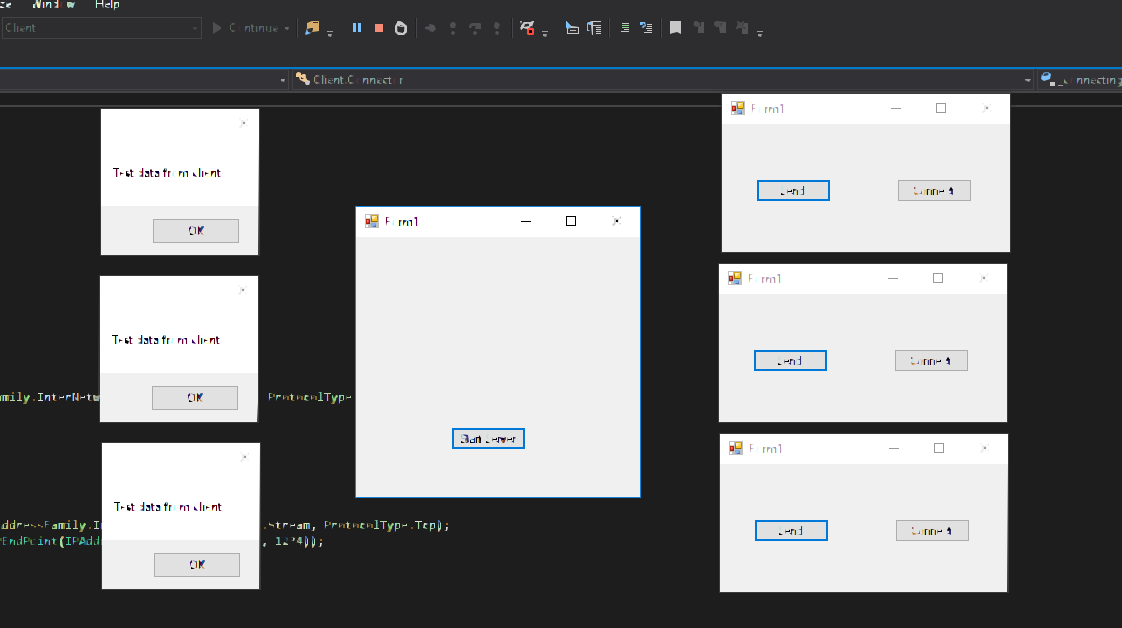
Finally, create two buttons: one to connect and one to send a message.
private void ConnectClick(object sender, EventArgs e)
{
    Connector tpp = new Connector();
    tpp.TryToConnect();
}

private void SendClick(object sender, EventArgs e)
{
    Client.SendString("Test data from client");
}
The client class I used in this example
public static void SetClient(Socket socket)
    {
        Id = 1;
        Socket = socket;
        Receive = new ReceivePacket(socket, Id);
        SendPacket = new SendPacket(socket);
    }
Notice
The Receive Class from the server is the same as the receive class from the client.
Conclusion
You now have a server and a client. You can extend this example so the server also receives files or other data, or sends a message back to the client. The server keeps a list of clients, so when something arrives you can tell which client sent it.
Final result: