Creating a new program using .NET Core
suggest changeFirst install the .NET Core SDK by going through the installation instructions for the platform of your choice:
After the installation has completed, open a command prompt, or terminal window.
- Create a new directory with
mkdir hello_worldand change into the newly created directory withcd hello_world. - Create a new console application with
dotnet new console.
This will produce two files:
- hello_world.csproj
<Project Sdk="Microsoft.NET.Sdk">
  <PropertyGroup>
    <OutputType>Exe</OutputType>
    <TargetFramework>netcoreapp1.1</TargetFramework>
  </PropertyGroup>
</Project>
Program.cs
using System;

namespace hello_world
{
    class Program
    {
        static void Main(string[] args)
        {
            Console.WriteLine("Hello World!");
        }
    }
}
- Restore packages with
dotnet restore. Current SDKs restore during build and run; a separate restore was required for the 1.x SDK this page shows. - Optional: build with
dotnet buildfor Debug ordotnet build -c Releasefor Release.dotnet runalso compiles and reports build errors. - Run with
dotnet runfor Debug, ordotnet run -c Releasefor Release.
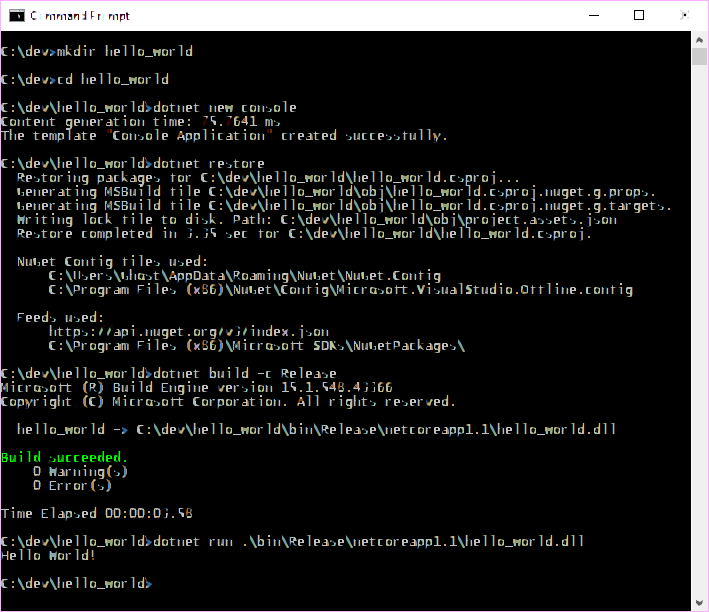
Command Prompt output
Found a mistake? Have a question or improvement idea?
Let me know.
Table Of Contents