DebuggerDisplay Attribute
suggest changeAdding the DebuggerDisplay Attribute will change the way the debugger displays the class when it is hovered over.
Expressions that are wrapped in {} will be evaluated by the debugger. This can be a simple property like in the following sample or more complex logic.
[DebuggerDisplay("{StringProperty} - {IntProperty}")]
public class AnObject
{
   public int ObjectId { get; set; }
   public string StringProperty { get; set; }
   public int IntProperty { get; set; }
}
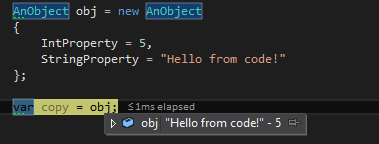
Adding ,nq before the closing bracket removes the quotes when outputting a string.
[DebuggerDisplay("{StringProperty,nq} - {IntProperty}")]
Even though general expressions are allowed in the {} they are not recommended. The DebuggerDisplay attribute will be written into the assembly metadata as a string. Expressions in {} are not checked for validity. So a DebuggerDisplay attribute containing more complex logic than i.e. some simple arithmetic might work fine in C#, but the same expression evaluated in VB.NET will probably not be syntactically valid and produce an error while debugging.
A way to make DebuggerDisplay more language agnostic is to write the expression in a method or property and call it instead.
[DebuggerDisplay("{DebuggerDisplay(),nq}")]
public class AnObject
{
   public int ObjectId { get; set; }
   public string StringProperty { get; set; }
   public int IntProperty { get; set; }

   private string DebuggerDisplay()
    {
        return $"{StringProperty} - {IntProperty}";
    }
}
The helper can include whichever properties you need, including the runtime type.
The example below also surrounds the helper method with #if DEBUG. The attribute string still names that method in every build, so a release binary has nothing for the debugger to call.
[DebuggerDisplay("{DebuggerDisplay(),nq}")]
public class AnObject
{
   public int ObjectId { get; set; }
   public string StringProperty { get; set; }
   public int IntProperty { get; set; }

#if DEBUG
   private string DebuggerDisplay()
    {
        return
            $"ObjectId:{this.ObjectId}, StringProperty:{this.StringProperty}, Type:{this.GetType()}";
    }
#endif
}