box-sizing
suggest changeThe default box model (content-box) can be counter-intuitive, since the width / height for an element will not represent its actual width or height on screen as soon as you start adding padding and border styles to the element.
The following example demonstrates this potential issue with content-box:
textarea {
    width: 100%;
    padding: 3px;
    box-sizing: content-box; /* default value */
}
Since the padding will be added to the width of the textarea, the resulting element is a textarea that is wider than 100%.
Fortunately, CSS allows us to change the box model with the box-sizing property. The two standard values are:
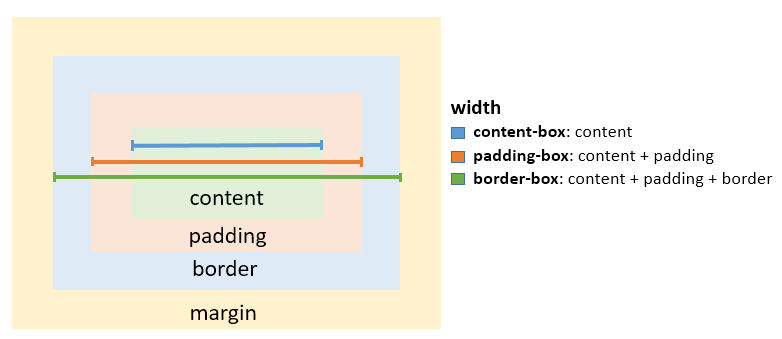
content-box: The common box model. Width and height include only the content, not the padding or border.border-box: Width and height include the content, the padding, and the border.
padding-box (width and height include the content and padding, but not the border) was never interoperable and has been removed from the specification. Use border-box instead.
To solve the textarea problem above, set box-sizing to border-box.
textarea {
    width: 100%;
    padding: 3px;
    box-sizing: border-box;
}
To apply a specific box model to every element on the page, use the following snippet:
html {
    box-sizing: border-box;
}

*, *:before, *:after {
    box-sizing: inherit;
}
In this pattern, box-sizing: border-box is not applied directly to *. Descendants inherit it, so an individual element can set a different value.