Basic concepts
suggest changeAn image is a rectangular grid of pixels. In the image
package, a pixel's color implements the color.Color
interface. An image.Rectangle describes
the image bounds, and an image.Point identifies
a position in that coordinate system.
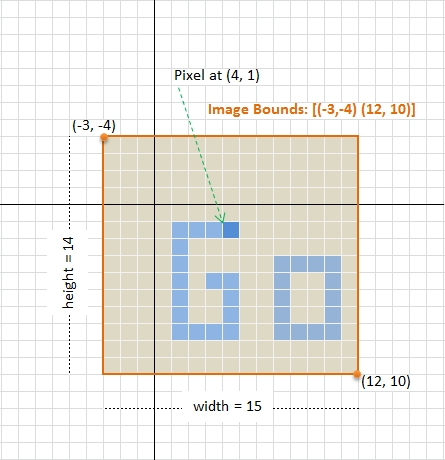
Image and 2-D geometry
The above figure illustrates the basic concepts of an image in the package. An image of size 15×14 pixels has rectangular bounds that start at the upper left corner (coordinate (-3, -4) in the figure) and extend right and down to the lower right corner (coordinate (12, 10)). The bounds do not necessarily start at or contain point (0, 0).
Image related type
In Go, an image implements the following image.Image interface:
type Image interface {
    // ColorModel returns the Image's color model.
    ColorModel() color.Model
    // Bounds returns the domain for which At can return non-zero color.
    // The bounds do not necessarily contain the point (0, 0).
    Bounds() Rectangle
    // At returns the color of the pixel at (x, y).
    // At(Bounds().Min.X, Bounds().Min.Y) returns the upper-left pixel of the grid.
    // At(Bounds().Max.X-1, Bounds().Max.Y-1) returns the lower-right one.
    At(x, y int) color.Color
}
in which the color.Color interface is defined as
type Color interface {
    // RGBA returns the alpha-premultiplied red, green, blue and alpha values
    // for the color. Each value ranges within [0, 0xffff], but is represented
    // by a uint32 so that multiplying by a blend factor up to 0xffff will not
    // overflow.
    //
    // An alpha-premultiplied color component c has been scaled by alpha (a),
    // so has valid values 0 <= c <= a.
    RGBA() (r, g, b, a uint32)
}
and color.Model is an interface declared as
type Model interface {
    Convert(c Color) Color
}
Accessing image dimension and pixel
Suppose an image is stored in img. Its dimensions and pixels can be read as follows:
// Image bounds and dimension
b := img.Bounds()
width, height := b.Dx(), b.Dy()
// do something with dimension ...

// Corner coordinates
top := b.Min.Y
left := b.Min.X
bottom := b.Max.Y
right := b.Max.X

// Accessing pixel. The (x,y) position must be
// started from (left, top) position not (0,0)
for y := top; y < bottom; y++ {
    for x := left; x < right; x++ {
        cl := img.At(x, y)
        r, g, b, a := cl.RGBA()
        // do something with r,g,b,a color component
    }
}
Note that in the package, the value of each R,G,B,A component is between 0-65535 (0x0000 - 0xffff), not 0-255.