Introduction to Image Maps
suggest changeDescription
An image map is an image with clickable areas that usually act as hyperlinks.
The image is defined by the <img> tag, and the map is defined by a <map> tag with <area> tags to denote each clickable area. Use the usemap and name attributes to bind the image and the map.
Basic Example
To create an image map so that each of the shapes in the image below are clickable:
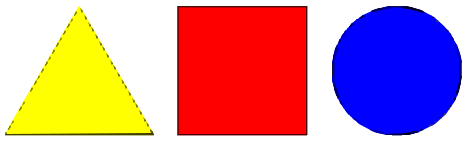
The picture shows a triangle, a square, and a circle.
The code would be as follows. Each <area> needs an href to be a hyperlink; without one, the shape is not a link.
<img src="http://jaced.com/blogpix/2007/trisquarecircle/002.gif" alt="A triangle, a square, and a circle" usemap="#shapes">
<map name="shapes">
    <area shape="polygon" coords="79,6,5,134,153,134" href="#triangle" alt="Triangle">
    <area shape="rectangle" coords="177,6,306,134" href="#square" alt="Square">
    <area shape="circle" coords="397,71,65" href="#circle" alt="Circle">
</map>
You should see that the browser recognizes the areas when the cursor becomes a pointer. See a live demo on JSFiddle.
Found a mistake? Have a question or improvement idea?
Let me know.
Table Of Contents