beginPath (a path command)
suggest changecontext.beginPath()
Begins assembling a new set of path commands and also discards any previously assembled path.
It does not move the pen. The current point is unset until the next moveTo (or a command such as lineTo that starts a subpath).
Although optional, you should ALWAYS start a path with beginPath
The discarding is an important and often overlooked point. If you don’t begin a new path with beginPath, any previously issued path commands will automatically be redrawn.
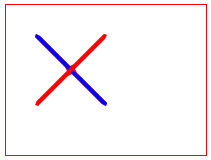
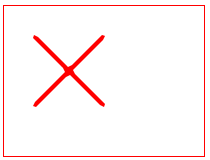
These 2 demos both attempt to draw an “X” with one red stroke and one blue stroke.
This first demo correctly uses beginPath before its second stroke (the red one). The result is that the “X” correctly has both a red and a blue stroke.
<!doctype html>
<html>
<head>
<style>
    body{ background-color:white; }
    #canvas{border:1px solid red; }
</style>
<script>
window.onload=(function(){

    // get a reference to the canvas element and its context
    var canvas=document.getElementById("canvas");
    var ctx=canvas.getContext("2d");

    // draw a blue line
    ctx.beginPath();
    ctx.moveTo(30,30);
    ctx.lineTo(100,100);
    ctx.strokeStyle='blue';
    ctx.lineWidth=3;
    ctx.stroke();

    // draw a red line
    ctx.beginPath();        // Important to begin a new path!
    ctx.moveTo(100,30);
    ctx.lineTo(30,100);
    ctx.strokeStyle='red';
    ctx.lineWidth=3;
    ctx.stroke();

}); // end window.onload
</script>
</head>
<body>
    <canvas id="canvas" width=200 height=150></canvas>
</body>
</html>
This second demo incorrectly leaves out beginPath on the second stroke. The result is that the “X” incorrectly has both red strokes.
The second stroke() draws the second red stroke.
But without a second beginPath, that same second stroke() also incorrectly redraws the first stroke.
Since the second stroke() is now styled as red, the first blue stroke is overwritten by an incorrectly colored red stroke.
<!doctype html>
<html>
<head>
<style>
    body{ background-color:white; }
    #canvas{border:1px solid red; }
</style>
<script>
window.onload=(function(){

    // get a reference to the canvas element and its context
    var canvas=document.getElementById("canvas");
    var ctx=canvas.getContext("2d");

    // draw a blue line
    ctx.beginPath();
    ctx.moveTo(30,30);
    ctx.lineTo(100,100);
    ctx.strokeStyle='blue';
    ctx.lineWidth=3;
    ctx.stroke();

    // draw a red line
    // Note: The necessary 'beginPath' is missing!
    ctx.moveTo(100,30);
    ctx.lineTo(30,100);
    ctx.strokeStyle='red';
    ctx.lineWidth=3;
    ctx.stroke();

}); // end window.onload
</script>
</head>
<body>
    <canvas id="canvas" width=200 height=150></canvas>
</body>
</html>