Introduction to context.getImageData
suggest changeThe canvas gives you the ability to fetch and change the color of any pixel on the canvas.
You can use Canvas’s pixel manipulation to:
- Create a color-picker for an image or select a color on a color-wheel.
- Create complex image filters like blurring and edge detection.
- Recolor any part of an image at the pixel level (if you use HSL you can even recolor an image while retaining the important Lighting & Saturation so the result doesn’t look like someone slapped paint on the image). Note: Canvas now has Blend Compositing that can also recolor an image in some cases.
- “Knockout” the background around a person/item in an image,
- Create a paint-bucket tool to detect and Floodfill part of an image (eg, change the color of a user-clicked flower petal from green to yellow).
- Examine an image for content (eg. facial recognition).
Common issues:
- For security reasons,
getImageDatais disabled if you have drawn an image originating on a different domain than the web page itself. getImageDatais a relatively expensive method because it creates a large pixel-data array and because it does not use the GPU to assist its efforts. Note: Canvas now has blend compositing that can do some of the same pixel manipulation thatgetImageDatadoes.- For .png images,
getImageDatamight not report the exact same colors as in the original .png file because the browser is allowed to do gamma-correction and alpha-premultiplication when drawing images on the canvas.
Getting pixel colors
Use getImageData to fetch the pixel colors for all or part of your canvas content.
The getImageData method returns an ImageData object.
The imageData object has a .data property that contains the pixel color information.
The data property is a Uint8ClampedArray containing the Red, Green, Blue & Alpha (opacity) color data for all requested pixels.
// determine which pixels to fetch (this fetches all pixels on the canvas)
var x=0;
var y=0;
var width=canvas.width;
var height=canvas.height;

// Fetch the imageData object
var imageData = context.getImageData(x,y,width,height);

// Pull the pixel color data array from the imageData object
var pixelDataArray = imageData.data;
You can get position of any [x,y] pixel within data array like this:
// byte index of pixel [x,y]; each pixel is 4 bytes (R, G, B, A)
var n = (y * width + x) * 4;
And then you can fetch that pixel’s red, green, blue & alpha values like this:
// the RGBA info for pixel [x,y]
var red=pixelDataArray[n];
var green=pixelDataArray[n+1];
var blue=pixelDataArray[n+2];
var alpha=pixelDataArray[n+3];
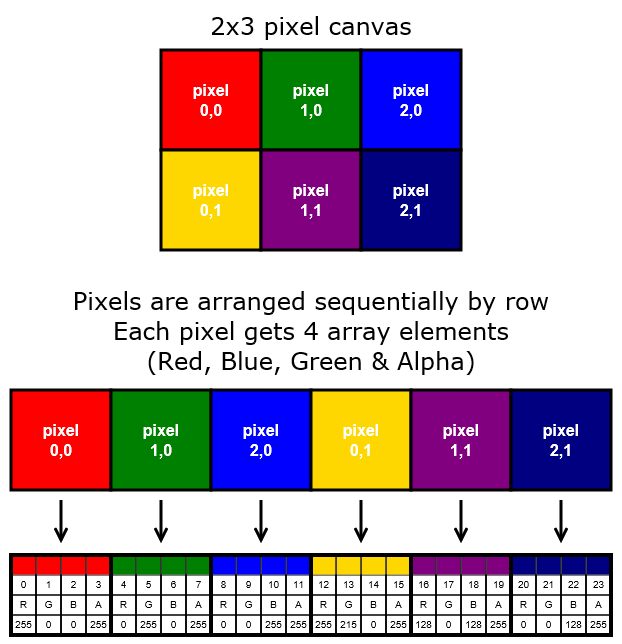
An Illustration showing how the pixel data array is structured
context.getImageData is illustrated below for a small 2x3 pixel sized canvas:
Found a mistake? Have a question or improvement idea?
Let me know.
Table Of Contents