Action Sheets with UIAlertController
suggest changeWith UIAlertController, action sheets like the deprecated UIActionSheet are created with the same API as alert views.
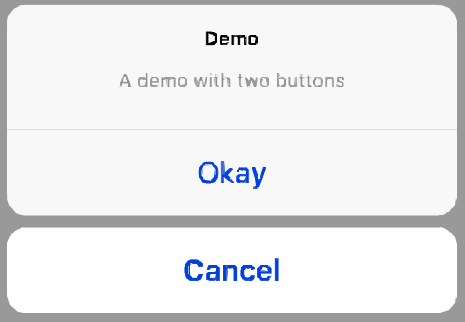
Simple Action Sheet with two buttons
Swift
let alertController = UIAlertController(title: "Demo", message: "A demo with two buttons", preferredStyle: UIAlertControllerStyle.actionSheet)
Objective-C
UIAlertController *alertController = [UIAlertController alertControllerWithTitle:@"Demo" message:@"A demo with two buttons" preferredStyle:UIAlertControllerStyleActionSheet];
Create the buttons “Cancel” and “Okay”
Swift
let cancelAction = UIAlertAction(title: "Cancel", style: .cancel) { (result : UIAlertAction) -> Void in
    //action when pressed button
}
let okAction = UIAlertAction(title: "Okay", style: .default) { (result : UIAlertAction) -> Void in
    //action when pressed button
}
Objective-C
UIAlertAction *cancelAction = [UIAlertAction actionWithTitle:@"Cancel" style:UIAlertActionStyleCancel handler:^(UIAlertAction * action) {
        //action when pressed button
    }];

UIAlertAction * okAction = [UIAlertAction actionWithTitle:@"Okay" style:UIAlertActionStyleDefault handler:^(UIAlertAction * action) {
        //action when pressed button
    }];
And add them to the action sheet:
Swift
alertController.addAction(cancelAction)
alertController.addAction(okAction)
Objective-C
[alertController addAction:cancelAction];
[alertController addAction:okAction];
Now present the UIAlertController:
Swift
self.present(alertController, animated: true, completion: nil)
Objective-C
[self presentViewController:alertController animated: YES completion: nil];
On iPad, an action sheet must have a source view or bar button item. Set popoverPresentationController?.sourceView (and a sourceRect) before presenting, or the app crashes.
This should be the result:
Action Sheet with destructive button
Using UIAlertActionStyle.destructive for a UIAlertAction creates a button with a red tint.
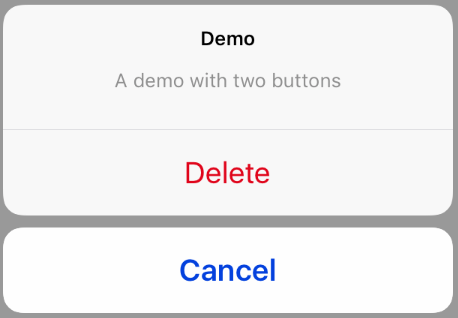
For this example, the okAction from above was replaced by this UIAlertAction:
Swift
let destructiveAction = UIAlertAction(title: "Delete", style: .destructive) { (result : UIAlertAction) -> Void in
    //action when pressed button
}
Objective-C
UIAlertAction * destructiveAction = [UIAlertAction actionWithTitle:@"Delete" style:UIAlertActionStyleDestructive handler:^(UIAlertAction * action) {
            //action when pressed button
        }];
Found a mistake? Have a question or improvement idea?
Let me know.
Table Of Contents