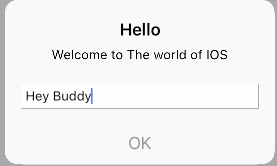
Adding Text Field in UIAlertController like a prompt Box
suggest changeSwift
let alert = UIAlertController(title: "Hello",
                              message: "Welcome to the world of iOS",
                              preferredStyle: .alert)
let defaultAction = UIAlertAction(title: "OK", style: .default) { action in
}
defaultAction.isEnabled = false
alert.addAction(defaultAction)

// `self` must conform to UITextFieldDelegate.
alert.addTextField { textField in
    textField.delegate = self
}

present(alert, animated: true, completion: nil)
Objective-C
UIAlertController* alert = [UIAlertController alertControllerWithTitle:@"Hello"
                                                               message:@"Welcome to the world of iOS"
                                                        preferredStyle:UIAlertControllerStyleAlert];

UIAlertAction* defaultAction = [UIAlertAction actionWithTitle:@"OK"
                                                        style:UIAlertActionStyleDefault
                                                      handler:^(UIAlertAction * action) {}];

defaultAction.enabled = NO;
[alert addAction:defaultAction];

[alert addTextFieldWithConfigurationHandler:^(UITextField *textField) {
     textField.delegate = self;
}];
[self presentViewController:alert animated:YES completion:nil];
Found a mistake? Have a question or improvement idea?
Let me know.
Table Of Contents