Basic CAShapeLayer Operation
suggest changeA circular CAShapeLayer from a UIBezierPath
CAShapeLayer *circleLayer = [CAShapeLayer layer];
[circleLayer setPath:[[UIBezierPath bezierPathWithOvalInRect:
CGRectMake(50, 50, 100, 100)] CGPath]];
circleLayer.lineWidth = 2.0;
[circleLayer setStrokeColor:[[UIColor redColor] CGColor]];
[circleLayer setFillColor:[[UIColor clearColor] CGColor]];
circleLayer.lineJoin = kCALineJoinRound;  //4 types are available to create a line style
circleLayer.lineDashPattern = [NSArray arrayWithObjects:
[NSNumber numberWithInt:2],[NSNumber numberWithInt:3 ], nil];
[[self.view layer] addSublayer:circleLayer];
self.currentShapeLayer = circleLayer;  // keep a reference so the layer can be removed later
self.view.layer.borderWidth = 1.0f;
self.view.layer.borderColor = [[UIColor blueColor]CGColor];  // that will plotted in the mainview
Remove ShapeLayer
Keep a reference to that shape layer. For example, you might have a property currentShapeLayer: Now that you have a reference, you can easily remove the layer:
Type 1:
[self.currentShapeLayer removeFromSuperlayer];
Type 2:
self.view.layer.sublayers = nil; // removes every sublayer, not only shape layers
Other Operation
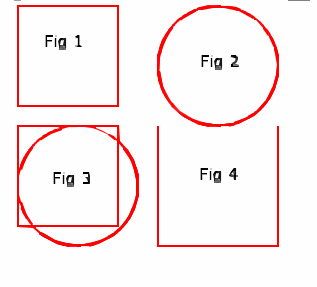
//Draw Square Shape

CAShapeLayer *squareLayer = [CAShapeLayer layer];
squareLayer.frame = CGRectMake(20, 20, 100, 100);
squareLayer.lineWidth = 2.0;
squareLayer.fillColor = nil;
squareLayer.strokeColor = [[UIColor redColor] CGColor];
squareLayer.path = [UIBezierPath bezierPathWithRect:squareLayer.bounds].CGPath;
[[self.view layer] addSublayer:squareLayer];


//Draw Circle Shape

CAShapeLayer *circleShape = [CAShapeLayer layer];
circleShape.frame = CGRectMake(160, 20, 120, 120);
circleShape.lineWidth = 2.0;
circleShape.fillColor = nil;
circleShape.strokeColor = [[UIColor redColor] CGColor];
circleShape.path = [UIBezierPath bezierPathWithOvalInRect:circleShape.bounds].CGPath;
[[self.view layer] addSublayer:circleShape];


//Subpaths
//UIBezierPath can have any number of “path segments” (or subpaths) so you can effectively draw as many shapes or lines as you want in a single path object

CAShapeLayer *shapeLayer = [CAShapeLayer layer];
shapeLayer.frame = CGRectMake(20, 140, 200, 200);
shapeLayer.lineWidth = 2.0;
shapeLayer.fillColor = nil;
shapeLayer.strokeColor = [[UIColor redColor] CGColor];
CGMutablePathRef combinedPath= CGPathCreateMutableCopy(circleShape.path);
CGPathAddPath(combinedPath, NULL, squareLayer.path);

shapeLayer.path = combinedPath;
CGPathRelease(combinedPath);
[[self.view layer] addSublayer:shapeLayer];

//Open Path
// Paths do not need to connect their end points back to their starting points. A path that connects back to its starting point is called a closed path, and one that does not is called an open path.

shapeLayer = [CAShapeLayer layer];
shapeLayer.frame = CGRectMake(160, 140, 300, 300);
shapeLayer.lineWidth = 2.0;
shapeLayer.fillColor = nil;
shapeLayer.strokeColor = [[UIColor redColor] CGColor];

UIBezierPath *linePath=[UIBezierPath bezierPath];
[linePath moveToPoint:CGPointZero];
[linePath addLineToPoint:CGPointMake(0 , 120)];
[linePath addLineToPoint:CGPointMake(120 , 120)];
[linePath addLineToPoint:CGPointMake(120 , 0)];
shapeLayer.path = linePath.CGPath;
[[self.view layer] addSublayer:shapeLayer];
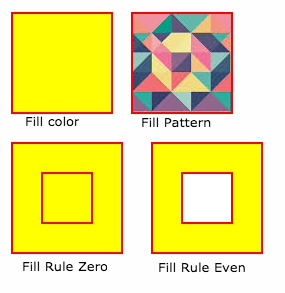
Fill Concepts
//Fill Color

CAShapeLayer *squareLayer = [CAShapeLayer layer];
squareLayer.frame = CGRectMake(20, 30, 100, 100);
squareLayer.lineWidth = 2.0;
squareLayer.fillColor = [[UIColor yellowColor]CGColor];
squareLayer.strokeColor = [[UIColor redColor] CGColor];
squareLayer.path = [UIBezierPath bezierPathWithRect:squareLayer.bounds].CGPath;
[[self.view layer] addSublayer:squareLayer];

//Fill Pattern Color
//images.jpeg

squareLayer = [CAShapeLayer layer];
squareLayer.frame = CGRectMake(140, 30, 100, 100);
squareLayer.lineWidth = 2.0;
squareLayer.fillColor = [[UIColor colorWithPatternImage:[UIImage imageNamed:@"images.jpeg"]]CGColor];
squareLayer.strokeColor = [[UIColor redColor] CGColor];
squareLayer.path = [UIBezierPath bezierPathWithRect:squareLayer.bounds].CGPath;
[[self.view layer] addSublayer:squareLayer];
//Fill Rule

//Type 1: kCAFillRuleNonZero
squareLayer = [CAShapeLayer layer];
squareLayer.frame = CGRectMake(0, 140, 150, 150);
squareLayer.lineWidth = 2.0;
squareLayer.fillColor = [[UIColor yellowColor]CGColor];
squareLayer.fillRule = kCAFillRuleNonZero;   // indicate the rule type
squareLayer.strokeColor = [[UIColor redColor] CGColor];
UIBezierPath *outerPath = [UIBezierPath bezierPathWithRect:CGRectInset(squareLayer.bounds, 20.0, 20.0)];
UIBezierPath *innerPath = [UIBezierPath bezierPathWithRect:CGRectInset(squareLayer.bounds, 50.0, 50.0)];
CGMutablePathRef combinedPath= CGPathCreateMutableCopy(outerPath.CGPath);
CGPathAddPath(combinedPath, NULL, innerPath.CGPath);
squareLayer.path = combinedPath;
CGPathRelease(combinedPath);
[[self.view layer] addSublayer:squareLayer];


//Type 2: kCAFillRuleEvenOdd
squareLayer = [CAShapeLayer layer];
squareLayer.frame = CGRectMake(140, 140, 150, 150);
squareLayer.lineWidth = 2.0;
squareLayer.fillColor = [[UIColor yellowColor]CGColor];
squareLayer.fillRule = kCAFillRuleEvenOdd;   // indicate the rule type
squareLayer.strokeColor = [[UIColor redColor] CGColor];
outerPath = [UIBezierPath bezierPathWithRect:CGRectInset(squareLayer.bounds, 20.0, 20.0)];
innerPath = [UIBezierPath bezierPathWithRect:CGRectInset(squareLayer.bounds, 50.0, 50.0)];
combinedPath= CGPathCreateMutableCopy(outerPath.CGPath);
CGPathAddPath(combinedPath, NULL, innerPath.CGPath);
squareLayer.path = combinedPath;
CGPathRelease(combinedPath);
[[self.view layer] addSublayer:squareLayer];
Style properties:
fillColor
     The color used to fill the path.

fillRule
     How overlapping subpaths are filled.
     1.  kCAFillRuleNonZero
     2.  kCAFillRuleEvenOdd

lineCap
     Below type used to change the style of the line.
     1.  kCALineCapButt
     2.  kCALineCapRound
     3.  kCALineCapSquare
lineDashPattern
     The dash pattern applied to the shape’s path when stroked.
     Create DashStyle while you will stroke the line.

lineDashPhase
     The dash phase applied to the shape’s path when stroked. Animatable.
lineJoin
     Line join style for the shape path.Below style use to draw the line join style.
     1.  kCALineJoinMiter
     2.  kCALineJoinRound
     3.  kCALineJoinBevel

lineWidth
     The width of the stroked path.

miterLimit
     The miter limit used when stroking the shape’s path. Animatable.

strokeColor
     Set the stroke color based on the path of the line.

strokeStart
     When the stroke will start.

strokeEnd
    When the stroke will end.
Found a mistake? Have a question or improvement idea?
Let me know.
Table Of Contents