Creating a Sandbox User
suggest changeIn App Store Connect (formerly iTunes Connect), open Users and Access and then Sandbox Testers. The older Users and Roles screen called this tab Sandbox Testers. Click + next to Testers.
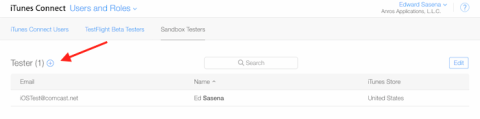
Fill out the information and click Save when you’re done. You can make up a first and last name for your test user, but the email address chosen must be a real email address as a verification will be sent to the address by Apple. Once you receive that email, be sure to click the link in it to verify your address. The email address must not already be an Apple ID. A Gmail alias, such as name+sandbox@gmail.com, works when you do not want a new mailbox.
Found a mistake? Have a question or improvement idea?
Let me know.
Table Of Contents