Custom Fonts with Storyboard
suggest changeCustom fonts for UI components in a storyboard can be set with User Defined Runtime Attributes and categories.
The advantages are:
- No need to define outlets for the UI element
- No need to set the font for those elements in code
- Font file: Add the font file (
.ttfor.otf) to the application target and add its file name to Info.plist under Fonts provided by application (UIAppFonts). See this documentation of custom fonts. - Define categories: Add a file such as
UIKit+IBExtensionsand add a category for each UI element (UILabel,UIButton, and so on) that should take a custom font. Each category adds afontNameproperty. Step 4 sets that property from the storyboard.
UIKit+IBExtensions.h
#import <UIKit/UIKit.h>

//Category extension for UILabel
@interface UILabel (IBExtensions)

@property (nonatomic, copy) NSString *fontName;
@end

// Category extension for UITextField
@interface UITextField (IBExtensions)

@property (nonatomic, copy) NSString *fontName;
@end

// Category extension for UIButton
@interface UIButton (IBExtensions)

@property (nonatomic, copy) NSString *fontName;
@end
- Getters and setters: Define the getter and setter for
fontNameon each category.fontWithName:size:returns nil whenfontNameis not the font’s PostScript name, and the control’s font then becomes nil. The size is the control’s current point size.
UIKit+IBExtensions.m
#import "UIKit+IBExtensions.h"

@implementation UILabel (IBExtensions)

- (NSString *)fontName {
    return self.font.fontName;
}

- (void)setFontName:(NSString *)fontName {
    self.font = [UIFont fontWithName:fontName size:self.font.pointSize];
}
@end

@implementation UITextField (IBExtensions)

- (NSString *)fontName {
    return self.font.fontName;
}

- (void)setFontName:(NSString *)fontName {
    self.font = [UIFont fontWithName:fontName size:self.font.pointSize];
}
@end

@implementation UIButton (IBExtensions)

- (NSString *)fontName {
    return self.titleLabel.font.fontName;
}

- (void)setFontName:(NSString *)fontName{
    self.titleLabel.font = [UIFont fontWithName:fontName size:self.titleLabel.font.pointSize];
}
@end
- Setting the font in the storyboard: In User Defined Runtime Attributes, set the key path to
fontName, the type to String, and the value to the font’s PostScript name (often different from the file name).
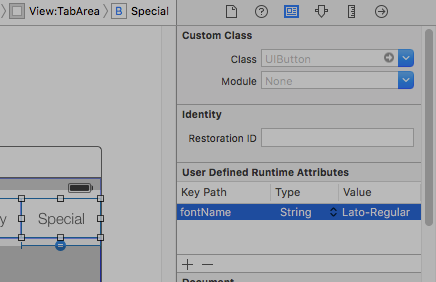
This will set your custom font while running the app.
Notes:
- This example uses the PostScript name
Lato-Regular. - The Info.plist entry is the file name, such as
Lato-Regular.ttf. The storyboard value is the PostScript name, without a path or extension. - The font size stays the size set in the Attributes Inspector.
Found a mistake? Have a question or improvement idea?
Let me know.
Table Of Contents