Dismiss Keyboard
suggest changeSwift
Control-drag from the UITextField in the storyboard to the view controller and create an outlet.
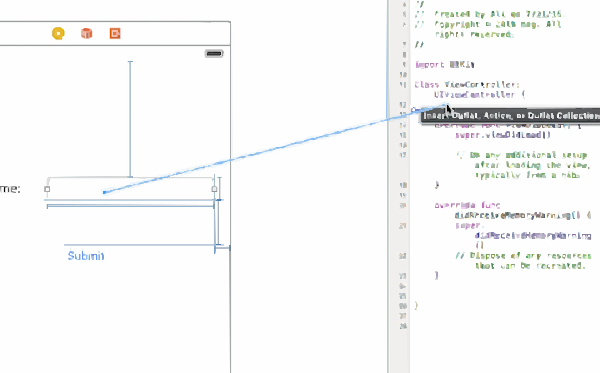
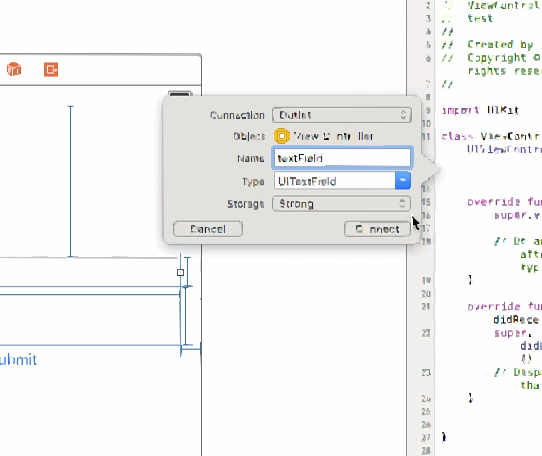
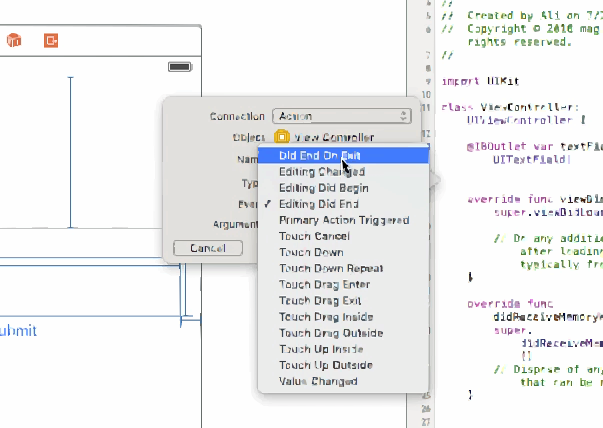
Select the text field again and Control-drag to the view controller. Choose an Action connection, set the event to Did End On Exit, and click Connect.
In that action, call resignFirstResponder() on the text field:
@IBAction func textFieldResign(sender: AnyObject) {
     yourTextFieldName.resignFirstResponder()
 }
This will take care of hiding the keyboard when pressing the return key on keyboard.
Another example of hiding the keyboard when return key is pressed:
Adopt UITextFieldDelegate, assign textField.delegate = self in viewDidLoad, and implement textFieldShouldReturn. These method names are Swift 2. Swift 3 uses textFieldShouldReturn(_:) and touchesBegan(_:with:).
class ViewController: UIViewController, UITextFieldDelegate {

    @IBOutlet var textField: UITextField!

    override func viewDidLoad() {
        super.viewDidLoad()
        self.textField.delegate = self
    }

    func textFieldShouldReturn(textField: UITextField) -> Bool {
        textField.resignFirstResponder()
        return true
    }

    override func touchesBegan(touches: Set<UITouch>, withEvent event: UIEvent?) {
        view.endEditing(true)
        super.touchesBegan(touches, withEvent: event)
    }
}
Objective-C
[textField resignFirstResponder];
Found a mistake? Have a question or improvement idea?
Let me know.
Table Of Contents