Highlighting an action button
suggest changeUIAlertController has a property that puts emphasis on an action already added to the controller. Use it to highlight one action. For Objective-C:
@property(nonatomic, strong) UIAlertAction *preferredAction
An action which is already added in the alert controller can be assigned to this property. The alert controller highlights that action. Assigning an action that was not added throws an exception.
This property can only be used with UIAlertControllerStyleAlert.
Following example shows how to use it.
UIAlertController *alertController = [UIAlertController alertControllerWithTitle:@"Cancel edit" message:@"Do you really want to cancel your edit?" preferredStyle:UIAlertControllerStyleAlert];
UIAlertAction *cancel = [UIAlertAction actionWithTitle:@"Cancel" style:UIAlertActionStyleCancel handler:^(UIAlertAction * action) {
    NSLog(@"Cancel");
}];

UIAlertAction *no = [UIAlertAction actionWithTitle:@"NO" style:UIAlertActionStyleDefault handler:^(UIAlertAction * action) {
    NSLog(@"Highlighted button is pressed.");
}];

[alertController addAction:cancel];
[alertController addAction:no];

// Add the no action as the preferred action.
//Note
//the action should already be added to alert controller
alertController.preferredAction = no;

[self presentViewController:alertController animated: YES completion: nil];
Alert controller with preferred action set. The NO button is highlighted.
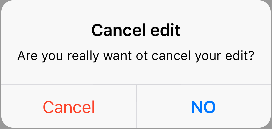
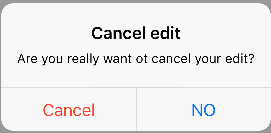
Alert controller with preferred action not set. The NO button is not highlighted.
Found a mistake? Have a question or improvement idea?
Let me know.
Table Of Contents