How to use Auto Layout
suggest changeAuto Layout arranges views so that they look right on any device and orientation. Constraints are the rules for how views are laid out. They include pinning edges, centering, and setting sizes, among other things.
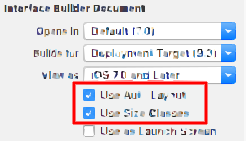
Auto Layout is enabled by default. To check, click Main.storyboard in the Project Navigator and open the File inspector. Make sure that Auto Layout and Size Classes are checked:
Auto layout constraints can be set in the Interface Builder or in code. In the Interface Builder you find the Auto Layout tools at the bottom right. Clicking them will reveal different options for setting the constraints on a view.

To use different constraints for different device sizes or orientations, set them with the size-class control in the bottom middle. wAny hAny is the older Interface Builder name for that control.
