Lighter and Darker Shade of a given UIColor
suggest changeThe code example below demonstrates how you can get a lighter and darker shade of a given color, useful in applications that have dynamic themes.
These are class methods, so they belong in a class or category. getRed:green:blue:alpha: returns NO for a color that cannot be converted to RGB, and the method then returns nil.
For Darker Color
+ (UIColor *)darkerColorForColor:(UIColor *)c
{
    CGFloat r, g, b, a;
    if ([c getRed:&r green:&g blue:&b alpha:&a])
        return [UIColor colorWithRed:MAX(r - 0.2, 0.0)
                               green:MAX(g - 0.2, 0.0)
                                blue:MAX(b - 0.2, 0.0)
                               alpha:a];
    return nil;
}
For Lighter Color
+ (UIColor *)lighterColorForColor:(UIColor *)c
{
    CGFloat r, g, b, a;
    if ([c getRed:&r green:&g blue:&b alpha:&a])
        return [UIColor colorWithRed:MIN(r + 0.2, 1.0)
                               green:MIN(g + 0.2, 1.0)
                                blue:MIN(b + 0.2, 1.0)
                               alpha:a];
    return nil;
}
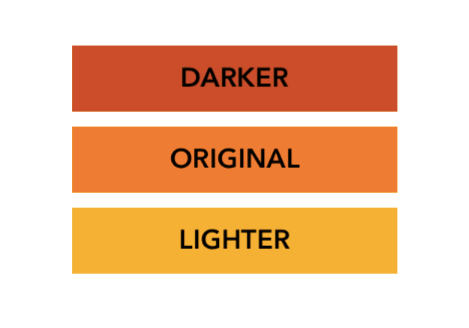
See the visual differences below. The given color is [UIColor orangeColor].
Found a mistake? Have a question or improvement idea?
Let me know.
Table Of Contents