Make the view rounded
suggest changeTo make a rounded UIView, specify a cornerRadius for the view’s layer.
This also applies to any class that inherits from UIView, such as UIImageView.
Programmatically
Swift Code
someImageView.layoutIfNeeded()
someImageView.clipsToBounds = true
someImageView.layer.cornerRadius = 10
Objective-C Code
[someImageView layoutIfNeeded];
someImageView.clipsToBounds = YES;
someImageView.layer.cornerRadius = 10;
Example
topImageView.layoutIfNeeded()
bottomImageView.layoutIfNeeded()
topImageView.clipsToBounds = true
topImageView.layer.cornerRadius = 10
bottomImageView.clipsToBounds = true
bottomImageView.layer.cornerRadius = bottomImageView.frame.width / 2
[topImageView layoutIfNeeded];
[bottomImageView layoutIfNeeded];
topImageView.clipsToBounds = YES;
topImageView.layer.cornerRadius = 10;
bottomImageView.clipsToBounds = YES;
bottomImageView.layer.cornerRadius = CGRectGetWidth(bottomImageView.frame) / 2;
Here is the result, showing the rounded view effect using the specified corner radius:
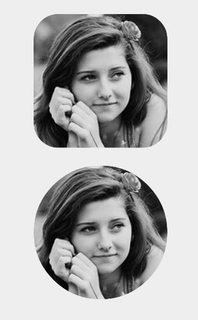
Example
Note
Older projects need the QuartzCore framework. Current UIKit targets already include it.
#import <QuartzCore/QuartzCore.h>
Storyboard Configuration
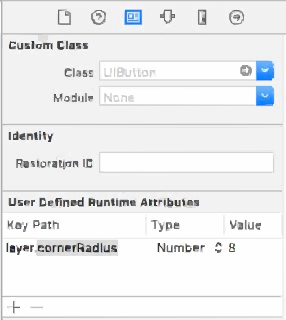
A rounded view effect can also be achieved non-programmatically by setting the corresponding properties in Storyboard.
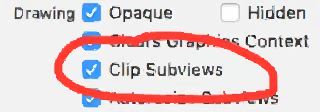
layer properties are not exposed in a storyboard, so set cornerRadius in User Defined Runtime Attributes. Also turn on Clips to Bounds, or the view’s contents stay square.
Swift Extension
You can use this extension to make a view a circle when its width and height are equal. Call it after layout. A zero frame produces a zero radius.
extension UIView {
    @discardableResult
    public func setAsCircle() -> Self {
        self.clipsToBounds = true
        let frameSize = self.frame.size
        self.layer.cornerRadius = min(frameSize.width, frameSize.height) / 2.0
        return self
    }
}
To use it:
yourView.setAsCircle()