Making an image into a circle or rounded
suggest changeThis example shows how to round a UIView or UIImageView with a radius:
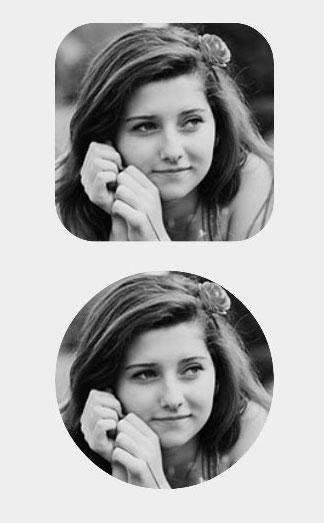
Objective-C
someImageView.layer.cornerRadius = CGRectGetHeight(someImageView.frame) / 2;
someImageView.clipsToBounds = YES;
Swift
someImageView.layer.cornerRadius = someImageView.frame.height/2
// this should alleviate the performance hit that adding transparency may cause - see http://stackoverflow.com/a/6254531/189804
// Be sure to check scrolling performance with Instruments if you take this approach.
someImageView.layer.shouldRasterize = true
someImageView.layer.rasterizationScale = UIScreen.main.scale
someImageView.clipsToBounds = true // All parts of the image that are outside its bounds (the frame) are cut out (makes the rounded corners visible)
Half the height is a circle only when the view is square. The layout example below uses half the width, which matches only in that same case. Without rasterizationScale, shouldRasterize draws at 1x and the corners look soft on a Retina display. Swift 2 spells the scale UIScreen.mainScreen().scale.
It is suggested that if you use autolayout that you put the someImageView.layer.cornerRadius code in viewDidLayoutSubviews. This will allow the image’s cornerRadius to update if the image changes size.
override func viewDidLayoutSubviews() {
    super.viewDidLayoutSubviews()
    someImageView.layer.cornerRadius = someImageView.frame.size.width/2
    someImageView.layer.masksToBounds = true
}
Found a mistake? Have a question or improvement idea?
Let me know.
Table Of Contents