Number of Lines
suggest changeWhen a label’s text is longer than one line, it is truncated and you see one line ending with three dots (…). That happens because numberOfLines defaults to 1. Setting the property tells the label how many lines it may use. If it is 5, the label can show 1, 2, 3, 4, or 5 lines. The ellipsis also depends on lineBreakMode; the default truncates the tail.
Setting the value programmatically
To set this property, simply assign a new integer to it:
Swift
label.numberOfLines = 2
Objective-C
label.numberOfLines = 2;
Note
Setting this property to 0 does not mean the label accepts no lines. It means the label can use as many lines as the text needs:
Swift
label.numberOfLines = 0
Objective-C
label.numberOfLines = 0;
Note
If the label has a height constraint, the constraint will be respected. In this case, label.numberOfLines = 0 may not work as expected.
Note
For more complex multi-line text, UITextView may be a better fit.
Setting the value in the Interface Builder
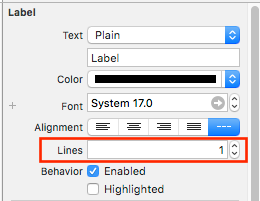
Instead of setting numberOfLines programmatically, you can use a Storyboard or a .xib and set the numberOfLines property. That way, we achieve the same results as the above code.
As shown below: