Play Audio in Background
suggest changeAdd a key named Required background modes in the property list (.plist), and set the item to App plays audio (audio), as in the following picture.
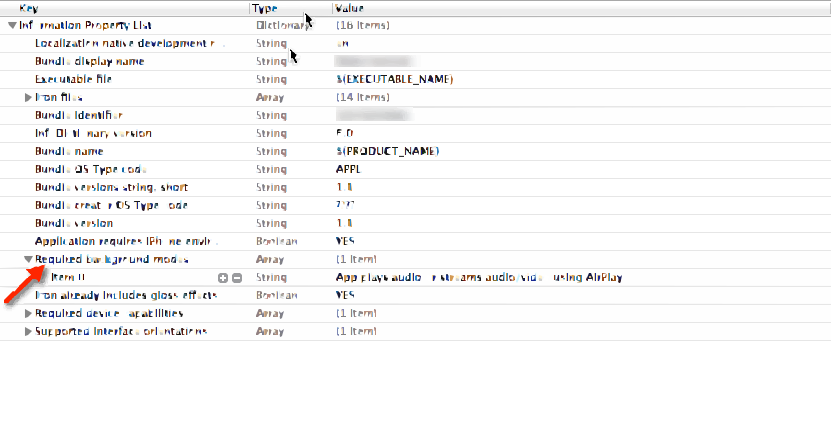
Add the following imports in AppDelegate.h:
#import <AVFoundation/AVFoundation.h>
#import <AudioToolbox/AudioToolbox.h>
AppDelegate.m
In application:didFinishLaunchingWithOptions:. setDelegate:, AudioSessionGetProperty, and beginReceivingRemoteControlEvents are deprecated. Use AVAudioSession interruption notifications and MPRemoteCommandCenter. These calls pass error:nil, so a failure is ignored.
[[AVAudioSession sharedInstance] setDelegate:self];
[[AVAudioSession sharedInstance] setCategory:AVAudioSessionCategoryPlayback error:nil];
[[AVAudioSession sharedInstance] setActive:YES error:nil];
[[UIApplication sharedApplication] beginReceivingRemoteControlEvents];

UInt32 size = sizeof(CFStringRef);
CFStringRef route = NULL;
AudioSessionGetProperty(kAudioSessionProperty_AudioRoute, &size, &route);
NSLog(@"route = %@", route);
To react to remote-control events, add the following method in AppDelegate.m. The app delegate receives it only if it is in the responder chain.
- (void)remoteControlReceivedWithEvent:(UIEvent *)theEvent {

    if (theEvent.type == UIEventTypeRemoteControl)    {
        switch(theEvent.subtype)        {
            case UIEventSubtypeRemoteControlPlay:
                [[NSNotificationCenter defaultCenter] postNotificationName:@"TogglePlayPause" object:nil];
                break;
            case UIEventSubtypeRemoteControlPause:
                [[NSNotificationCenter defaultCenter] postNotificationName:@"TogglePlayPause" object:nil];
                break;
            case UIEventSubtypeRemoteControlStop:
                break;
            case UIEventSubtypeRemoteControlTogglePlayPause:
                [[NSNotificationCenter defaultCenter] postNotificationName:@"TogglePlayPause" object:nil];
                break;
            default:
                return;
        }
    }
}
Handle TogglePlayPause where the player lives.
Found a mistake? Have a question or improvement idea?
Let me know.
Table Of Contents