Proportional Layout
suggest changeA constraint created as:
NSLayoutConstraint(item: myView, attribute: NSLayoutAttribute.Leading, relatedBy: NSLayoutRelation.Equal, toItem: view, attribute: NSLayoutAttribute.LeadingMargin, multiplier: 1.0, constant: 20.0)
or, from a math point of view:
view.attribute * multiplier + constant (1)
You can use the multiplier to create a proportional layout for a different size factor. This initializer is Swift 2.
Example:
Turquoise view (V1) is a square whose width is proportional to the superview width with ratio 1:1.1.
Gray square (V2) is a subview of V1. Bottom space is a constant of 60. Trailing space uses multiplier 1.125 and constant 0.
Trailing space is proportional. Bottom space is a constant.
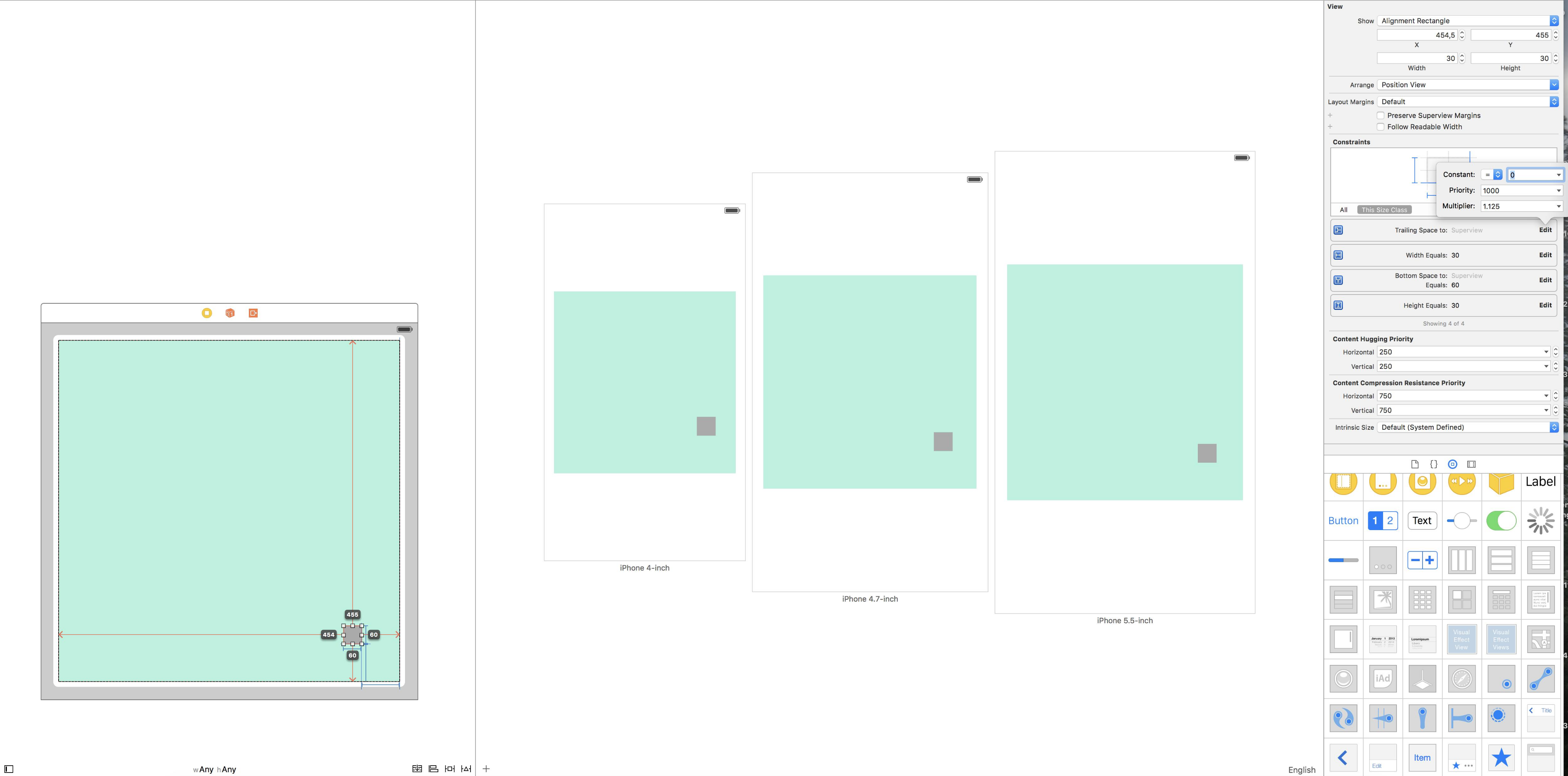
The multiplied value is the second item’s attribute. If that attribute is 0, the multiplier has no effect and the result is constant. Use another item, or a margin attribute, so the multiplied attribute is not 0. The 1:1.1 and 1.125 figures were not rechecked against the image.
Found a mistake? Have a question or improvement idea?
Let me know.
Table Of Contents