Separator Lines
suggest changeEditing the width of Separator Lines
You can make your table view’s separator lines extend to various widths by changing layoutMargins on your cells. On iOS 8 and later, also set the cell’s preservesSuperviewLayoutMargins to false, or the cell keeps the table’s inset. These Swift samples are Swift 2.
Changing the Separator Lines for specific cells
In either your table view data source’s cellForRowAtIndexPath: method or the willDisplayCell: method, set the cell’s layoutMargins to UIEdgeInsetsZero (extends to the full width of the table), or to whatever you may desire here. "Cell" must already be registered, or the dequeue crashes.
Objective-C
[cell setLayoutMargins:UIEdgeInsetsZero];

// May also use separatorInset
[cell setSeparatorInset:UIEdgeInsetsZero];
Swift
func tableView(tableView: UITableView, willDisplayCell cell: UITableViewCell, forRowAtIndexPath indexPath: NSIndexPath) {
    cell.separatorInset = UIEdgeInsetsZero
    cell.layoutMargins = UIEdgeInsetsZero
}

func tableView(tableView: UITableView, cellForRowAtIndexPath indexPath: NSIndexPath) -> UITableViewCell {
    let cell = tableView.dequeueReusableCellWithIdentifier("Cell", forIndexPath: indexPath)
    cell.separatorInset = UIEdgeInsetsZero
    cell.layoutMargins = UIEdgeInsetsZero
    return cell
}
Remove all Separator Lines
The thin gray lines between each cell may not be exactly the look you’re going for. It’s fairly straightforward to hide them from view.
In your encompassing UIViewController’s viewDidLoad: method add the following code. You may also set this property at any time before loading or reloading the table view (does not necessarily need to be in the viewDidLoad: method).
Swift:
tableView.separatorStyle = .None
Objective-C:
tableView.separatorStyle = UITableViewCellSeparatorStyleNone;
Alternatively, the property can be changed in your Storyboard or XIB by selecting your tableView and setting separator (under the attributes inspector) to None.
Hide excess Separator Lines
You can hide the UITableViewCell separator lines for empty cells by setting an empty footer view at the bottom of a UITableView:
Swift
tableView.tableFooterView = UIView()
Objective-C
tableView.tableFooterView = [[UIView alloc] initWithFrame:CGRectZero];
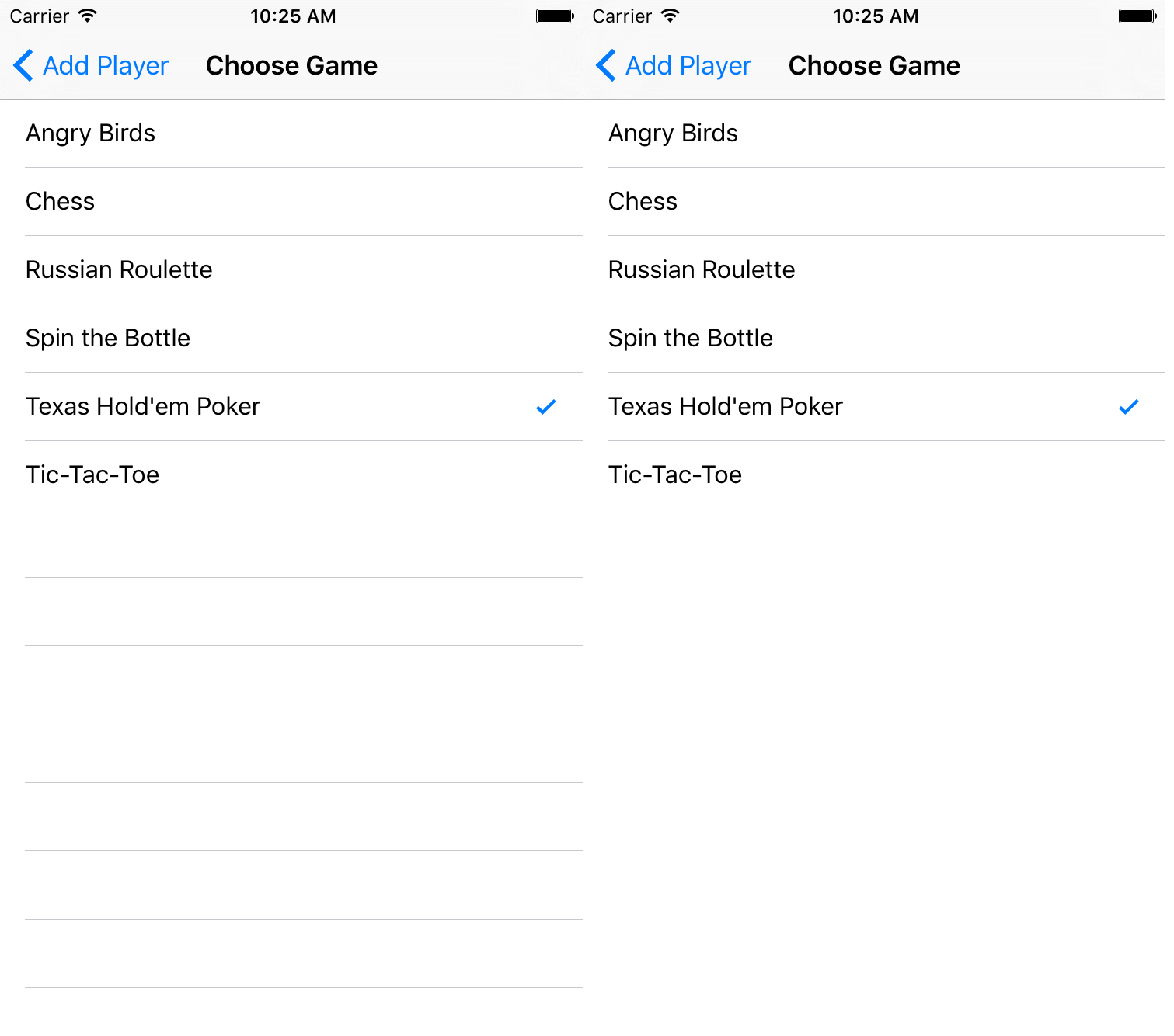
Image is from Ray Wenderlich.
