Setting up deeplink for your app
suggest changeSetting up deep-linking for your app is easy. You just need a small URL with which you want to open your app.
Follow the steps to set up deep-linking for your app.
- Let's create a project and name it DeepLinkPOC.
- Now select your project target.
- After selecting target,select the ‘info’ tab.
- Scroll down to the bottom until you see an option of URL Types
- Click ‘+’ option.
- You will see URL schemes. Add a string with which you want to open your app. Let's add “DeepLinking” in URL schemes.
So, to open your app you can launch it by typing “DeepLinking://” into your safari. Your deep-linking string has following format.
[scheme]://[host]/[path] --> DeepLinking://path/Page1
where, Scheme : “DeepLinking” Host : “path” path : “Page1”
Note : The app still launches if you omit the host and path. You can add a host and path to open a particular page after launch. The methods below are the pre-iOS 9 openURL callback. The Swift signature is Swift 2. Type the scheme as a URL. A Safari search for that text does not open the app.
- Now add following method to your appdelegate.
Swift:
func application(application: UIApplication, openURL url: NSURL, sourceApplication: String?, annotation: AnyObject) -> Bool
Objective-c:
-(BOOL)application:(UIApplication *)application
          openURL:(NSURL *)url
          sourceApplication:(NSString *)sourceApplication
          annotation:(id)annotation
The above method is called whenever your app is launched using a deep-linking string you set for your app.
- Now is the time to install your app but wait before you directly jump to run button.Lets do a small change in scheme’s app-launch method.
- Select and edit your scheme as
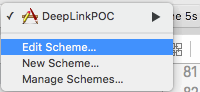
-
change its launch type and close
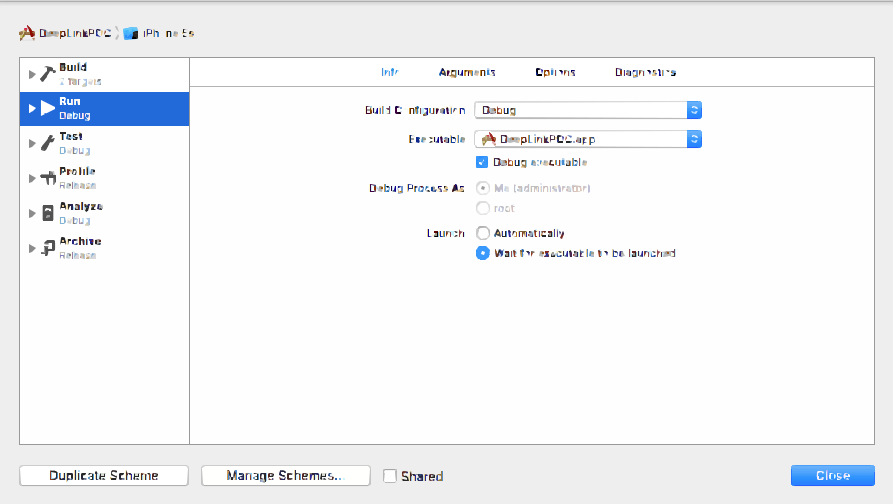
- Now click the Run button (if you want you can add breakpoint to your didFinishLaunchingWithOptions and openURL methods to observe values)
- You’ll see a message “Waiting for DeepLinkPOC(or your app name) to launch”.
- Open safari and type in “DeepLinking://” into the search bar this will show prompt “open this page in DeepLinkPOC” click open to launch your app.
Hope you got to know how to set up deep-linking for your app :)