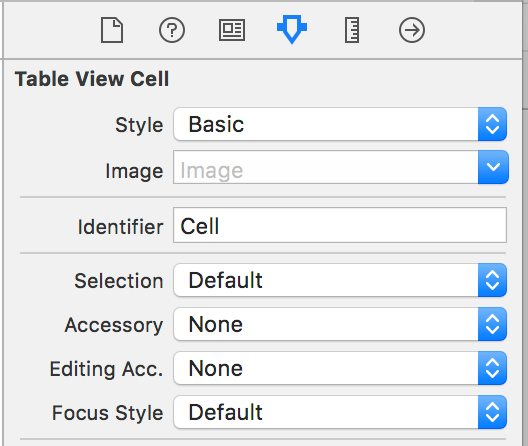
TableView with dynamic properties with tableviewCellStyle basic.
suggest changeoverride func numberOfSections(in tableView: UITableView) -> Int {
// You need to return minimum one to show the cell inside the tableview
return 1
}
override func tableView(_ tableView: UITableView, numberOfRowsInSection section: Int) -> Int {
// return the number of rows inside the tableview.
return 3
}
override func tableView(_ tableView: UITableView, cellForRowAt indexPath: IndexPath) -> UITableViewCell {
let cell = tableView.dequeueReusableCell(withIdentifier: "Cell", for: indexPath)
// identifier string should be same as what you have entered in the cell Attribute inspector -> identifier (see the image).
// Configure the cell...
cell.textLabel?.text = "Cell \(indexPath.row) :" + "Hello"
// The storyboard cell style has to be Basic for this textLabel layout.
// Styles include custom, basic, right detail, left detail, and subtitle.
// For custom you can use your own objects and constraints. For the other styles,
// select the style in the attributes inspector. (see the image for changing the style)
return cell
}
override func tableView(_ tableView: UITableView, didSelectRowAt indexPath: IndexPath) {
// this delegate method will trigger when you click a cell
}
Found a mistake? Have a question or improvement idea?
Let me know.
Table Of Contents