Utilizing Intrinsic Content Size
suggest changeWhen creating a UIView subclass, intrinsic content size helps avoid hardcoded height and width constraints.
A basic glimpse into how a class can use it. This sample is Swift 2 (intrinsicContentSize() and UIViewNoIntrinsicMetric). The class omits its initializers, and image has no initial value, so this does not compile as written.
class ImageView: UIView {

    var image: UIImage { didSet { invalidateIntrinsicContentSize() } } // omitting initializers // convenience init(image: UIImage)

    override func intrinsicContentSize() -> CGSize {
        return CGSize(width: image.size.width, height: image.size.height)
    }
}
If you only want to provide one size intrinsically, you can provide the value UIViewNoIntrinsicMetric for the value that you wish to ignore. The height below uses the image width.
override func intrinsicContentSize() -> CGSize {
     return CGSize(width: UIViewNoIntrinsicMetric, height: image.size.width)
}
Benefits when using Auto Layout and Interface Builder
One could take this ImageView (or UIImageView) and set the horizontal alignment to superview center X and the vertical alignment to superview center Y.
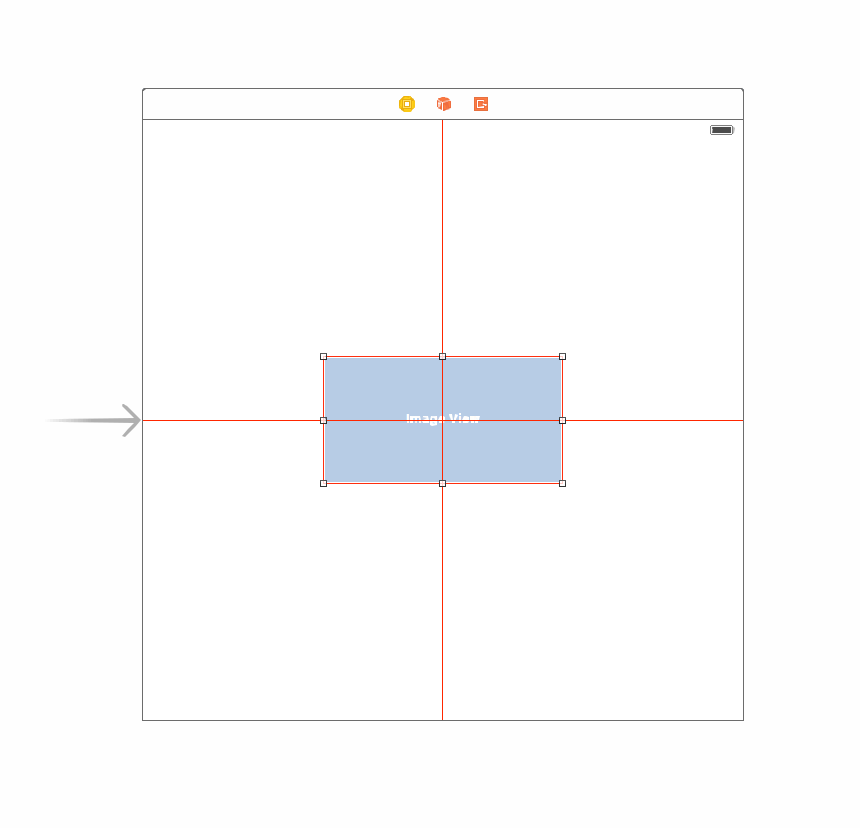
Interface builder will complain to you at this point giving the following warning:
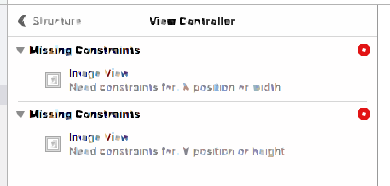
This is where Placeholder Intrinsic Size comes in.
Going into the Size inspector panel, and down to the Intrinsic Size dropdown, you can switch this value from Default to Placeholder.
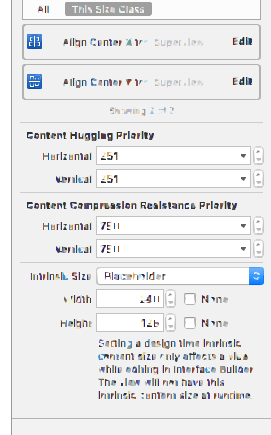
And now Interface Builder will remove the previous warnings, and you can use this size to lay out dynamically sized views in Interface Builder.