Visual Format Language Basics Constraints in Code
suggest changeVFL is a language designed to constrain UI elements in a simple and quick fashion. Generally, VFL has an advantage over traditional UI customization in Interface Builder because it’s much more readable, accessible, and compact.
Here’s an example of VFL in which three UIViews are constrained from left to right, filling the superview’s width, with aGradeView and bGradeView each 40 points wide:
"H:|[bgView][aGradeView(40)][bGradeView(40)]|"
There are two axes in which we can constrain UI Objects to, Horizontally and Vertically.
Each line of VFL always begins with H: or V:. If neither are present, the default option is H:
Moving on, we have a pipeline. | This symbol, or the pipe, refers to the superview. If you take a closer look at the snippet of VFL code above, you’d notice two of these pipelines.
This signifies the two horizontal ends of the superview, the outer left and outer right boundaries.
Next up you’ll see some square brackets, within the first set of square brackets, we have bgView. When we’ve got square brackets, it’s referring to a UI element, now you might wonder how we establish a link between the name and the actual UI element, an outlet perhaps?
I’ll cover that at the end of the post.
If you take a look at the second pair of square brackets [aGradeView(40)], we have some parentheses encapsulated within as well. When that is present, it defines the width or height depending on the axis, which in this case is 40 points in width.
The first square brackets [bgView] did not have a width explicitly defined, meaning that it’ll span out as far as possible.
Alright, that’s it for the basics, more on the advanced stuff in another example.
For example:
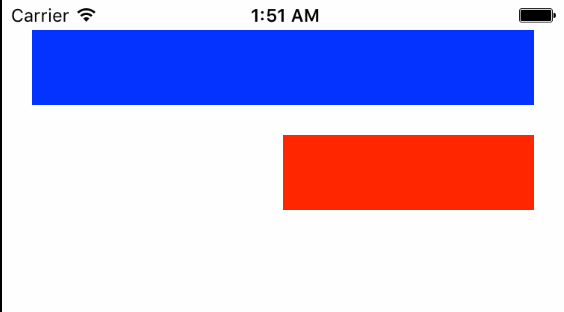
// 1. create views
UIView *blueView = [[UIView alloc] init];
blueView.backgroundColor = [UIColor blueColor];
[self.view addSubview:blueView];

UIView *redView = [[UIView alloc] init];
redView.backgroundColor = [UIColor redColor];
[self.view addSubview:redView];

// 2. forbid Autoresizing
blueView.translatesAutoresizingMaskIntoConstraints = NO;
redView.translatesAutoresizingMaskIntoConstraints = NO;

// 3. make constraints
// horizontal
NSArray *blueH = [NSLayoutConstraint constraintsWithVisualFormat:@"H:|-20-[blueView]-20-|" options:NSLayoutFormatAlignAllLeft metrics:nil views:@{@"blueView" : blueView}];
[self.view addConstraints:blueH];

// vertical
NSArray *blueVandRedV = [NSLayoutConstraint constraintsWithVisualFormat:@"V:|-20-[blueView(50)]-20-[redView(==blueView)]" options:NSLayoutFormatAlignAllTrailing metrics:nil views:@{@"blueView" : blueView, @"redView" : redView}];
[self.view addConstraints:blueVandRedV];

NSLayoutConstraint *redW = [NSLayoutConstraint constraintWithItem:redView attribute:NSLayoutAttributeWidth relatedBy:NSLayoutRelationEqual toItem:blueView attribute:NSLayoutAttributeWidth multiplier:0.5 constant:0];
[self.view addConstraint:redW];