Reading an XML file
suggest changeIn order to load the XML data with XOM you will need to make a Builder from which you can build it into a Document.
Builder builder = new Builder();
Document doc = builder.build(file);
To get the root element, the highest parent in the xml file, call getRootElement() on the Document instance.
Element root = doc.getRootElement();
Now the Element class has a lot of handy methods that make reading xml really easy. Some of the most useful are listed below:
getChildElements(String name)- returns anElementsinstance that acts as an array of elementsgetFirstChildElement(String name)- returns the first child element with that tag.getValue()- returns the value inside the element.getAttributeValue(String name)- returns the value of an attribute with the specified name.
When you call getChildElements() you get an Elements instance. From this you can loop through and call the get(int index) method on it to retrieve all the elements inside.
Elements colors = root.getChildElements("color");
for (int q = 0; q < colors.size(); q++){
    Element color = colors.get(q);
}
Example: Here is an example of reading an XML File:
XML File:
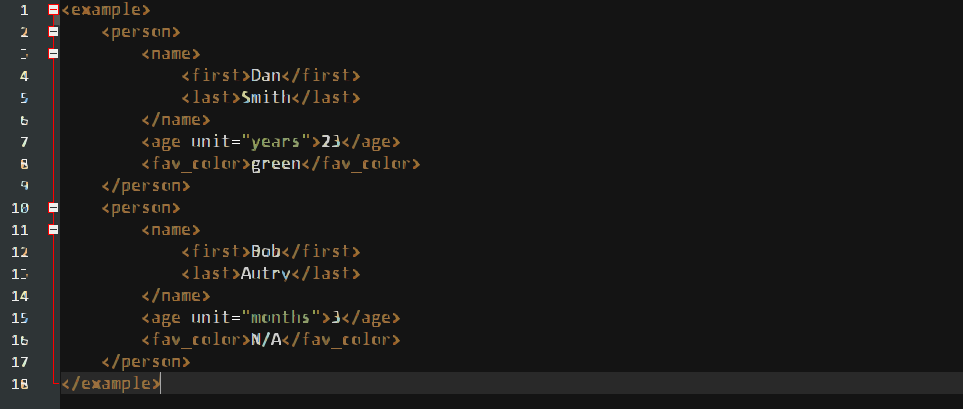
Code for reading and printing it:
import java.io.File;
import java.io.IOException;
import nu.xom.Builder;
import nu.xom.Document;
import nu.xom.Element;
import nu.xom.Elements;
import nu.xom.ParsingException;

public class XMLReader {

    public static void main(String[] args) throws ParsingException, IOException{
        File file = new File("insert path here");
        // builder builds xml data
        Builder builder = new Builder();
        Document doc = builder.build(file);

        // get the root element <example>
        Element root = doc.getRootElement();

        // gets all elements with the tag <person>
        Elements people = root.getChildElements("person");

        for (int q = 0; q < people.size(); q++){
            // get the current person element
            Element person = people.get(q);

            // get the name element and its children: first and last
            Element nameElement = person.getFirstChildElement("name");
            Element firstNameElement = nameElement.getFirstChildElement("first");
            Element lastNameElement = nameElement.getFirstChildElement("last");

            // get the age element
            Element ageElement = person.getFirstChildElement("age");

            // get the favorite color element
            Element favColorElement = person.getFirstChildElement("fav_color");

            String fName, lName, ageUnit, favColor;
            int age;

            try {
                fName = firstNameElement.getValue();
                lName = lastNameElement.getValue();
                age = Integer.parseInt(ageElement.getValue());
                ageUnit = ageElement.getAttributeValue("unit");
                favColor = favColorElement.getValue();

                System.out.println("Name: " + lName + ", " + fName);
                System.out.println("Age: " + age + " (" + ageUnit + ")");
                System.out.println("Favorite Color: " + favColor);
                System.out.println("----------------");

            } catch (NullPointerException ex){
                ex.printStackTrace();
            } catch (NumberFormatException ex){
                ex.printStackTrace();
            }
        }
    }

}
This will print out in the console:
Name: Smith, Dan
Age: 23 (years)
Favorite Color: green
----------------
Name: Autry, Bob
Age: 3 (months)
Favorite Color: N/A
----------------
Found a mistake? Have a question or improvement idea?
Let me know.
Table Of Contents