Saving Properties as XML
suggest changeStoring Properties in an XML File
The way you store properties files as XML files is very similar to the way you would store them as .properties files. Just instead of using the store() you would use storeToXML().
public void saveProperties(String location) throws IOException{
    // make new instance of properties
    Properties prop = new Properties();

    // set the property values
    prop.setProperty("name", "Steve");
    prop.setProperty("color", "green");
    prop.setProperty("age", "23");

    // check to see if the file already exists
    File file = new File(location);
    if (!file.exists()){
        file.createNewFile();
    }

    // save the properties
    try (FileOutputStream out = new FileOutputStream(file)) {
        prop.storeToXML(out, "testing properties with xml");
    }
}
When you open the file it will look like this.
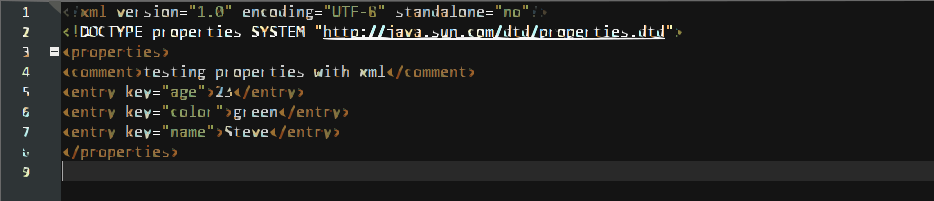
Loading Properties from an XML File
Now to load this file as a Properties object you need to call loadFromXML() instead of the load() that you would use with regular .properties files.
public static void loadProperties(String location) throws FileNotFoundException, IOException{
    // make new properties instance to load the file into
    Properties prop = new Properties();

    // check to make sure the file exists
    File file = new File(location);
    if (file.exists()){
        // load the file
        try (FileInputStream in = new FileInputStream(file)) {
            prop.loadFromXML(in);
        }

        // print out all the properties
        for (String name : prop.stringPropertyNames()){
            System.out.println(name + "=" + prop.getProperty(name));
        }
    } else {
        System.err.println("Error: No file found at: " + location);
    }
}
When you run this code you will get these properties in the console. stringPropertyNames() does not promise this order:
age=23
color=green
name=Steve
Found a mistake? Have a question or improvement idea?
Let me know.
Table Of Contents