Using window.confirm
suggest changeThe window.confirm() method displays a modal dialog with an optional message and two buttons, OK and Cancel.
Now, let’s take the following example:
result = window.confirm(message);
message and result are not declared in this fragment. In a non-strict script, an undeclared message is undefined, and the dialog shows that word. message is otherwise the optional string to display, and result is true when the user chooses OK.
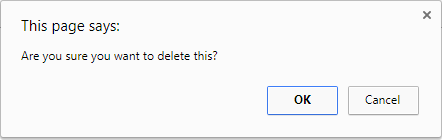
window.confirm() is typically used to ask for user confirmation before doing a dangerous operation like deleting something in a Control Panel:
if (window.confirm("Are you sure you want to delete this?")) {
    deleteItem(itemId);
}
The output of that code would look like this in the browser:
If you need it for later use, you can simply store the result of the user’s interaction in a variable:
const deleteConfirm = window.confirm("Are you sure you want to delete this?");
Notes
- The argument is optional and not required by the specification.
- Dialog boxes are modal windows - they prevent the user from accessing the rest of the program’s interface until the dialog box is closed. For this reason, you should not overuse any function that creates a dialog box (or modal window). And regardless, there are very good reasons to avoid using dialog boxes for confirmation.
- Starting with Chrome 46.0 this method is blocked inside an
<iframe>unless its sandbox attribute has the value allow-modal. - It is commonly accepted to call the confirm method with the window notation removed as the window object is always implicit. However, it is recommended to explicitly define the window object as expected behavior may change due to implementation at a lower scope level with similarly named methods.
Found a mistake? Have a question or improvement idea?
Let me know.
Table Of Contents