Un-pivot a dynamic set of columns based on condition
suggest changeThe following example is a very useful basis when you are trying to convert transaction data to un-pivoted data for BI/reporting reasons, where the dimensions which are to be un-pivoted can have a dynamic set of columns.
For our example, we suppose that the raw data table contains employee assessment data in the form of marked questions.
The raw data table is the following:
create table rawdata

(
 PersonId VARCHAR(255)
,Question1Id INT(11)
,Question2Id INT(11)
,Question3Id INT(11)
)
The rawdata table is a temporary table as part of the ETL procedure and can have a varying number of questions. The goal is to use the same un-pivoting procedure for an arbitrary number of Questions, namely columns that are going to be un-pivoted.
Below is a toy example of rawdata table:
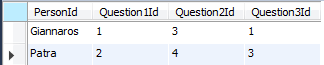
The well-known,static way to unpivot the data, in MYSQL is by using UNION ALL:
create table unpivoteddata

(

 PersonId VARCHAR(255)
,QuestionId VARCHAR(255)
,QuestionValue INT(11)

);

INSERT INTO unpivoteddata SELECT PersonId, 'Question1Id' col, Question1Id
FROM rawdata
UNION ALL
SELECT PersonId, 'Question2Id' col, Question2Id
FROM rawdata
UNION ALL
SELECT PersonId, 'Question3Id' col, Question3Id
FROM rawdata;
In our case we want to unpivot an arbitrary number of question columns. A prepared statement builds that SELECT. GROUP_CONCAT keeps columns whose DATA_TYPE is int and includes the surrounding SQL text. Raise group_concat_max_len if the generated statement may exceed 1024 characters. Qualify table_schema as well when more than one database has a table named rawdata. DATA_TYPE is stored in lowercase; a case-insensitive collation still matches 'Int'.
set @temp2 = null;

SELECT GROUP_CONCAT(' SELECT ', 'PersonId',',','''',COLUMN_NAME,'''', ' col     ',',',COLUMN_NAME,' FROM rawdata' separator ' UNION ALL' ) FROM     INFORMATION_SCHEMA.COLUMNS WHERE table_name = 'rawdata' AND DATA_TYPE = 'Int' INTO     @temp2;

select @temp2;
In another occasion we could have chosen columns that the column name matches a pattern, for example instead of
DATA_TYPE = 'Int'
use
COLUMN_NAME LIKE 'Question%'
or something suitable that can be controlled through the ETL phase.
The prepared statement is finalized as follows:
set @temp3 = null;

select concat('INSERT INTO unpivoteddata',@temp2) INTO @temp3;

select @temp3;

prepare stmt FROM @temp3;
execute stmt;
deallocate prepare stmt;
The unpivoteddata table is the following:
SELECT * FROM unpivoteddata
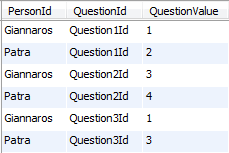
Selecting columns according to a condition and then crafting a prepared statement is an efficient way of dynamically un-pivoting data.