Logging
suggest changeConsole Module
Similar to the browser environment of JavaScript node.js provides a console module which provides simple logging and debugging possibilities.
The most important methods provided by the console module are console.log, console.error and console.time. But there are several others like console.info.
console.log
The parameters will be printed to the standard output (stdout) with a new line.
console.log('Hello World');

console.error
The parameters will be printed to the standard error (stderr) with a new line.
console.error('Oh, sorry, there is an error.');

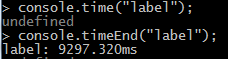
console.time, console.timeEnd
console.time starts a timer with a unique label. console.timeEnd with the same label stops it and prints the elapsed milliseconds to stdout.
Process Module
process.stdout.write writes to standard output and does not add a newline. console.log does.
So in the following example the method is called two times, but no new line is added in between their outputs.

Formatting
One can use terminal (control) codes to issue specific commands like switching colors or positioning the cursor.

General
| Effect | Code |
|---|---|
| Reset | \033[0m |
| Bold/bright | \033[1m |
| Underline | \033[4m |
| Inverse | \033[7m |
Font Colors
| Effect | Code |
|---|---|
| Black | \033[30m |
| Red | \033[31m |
| Green | \033[32m |
| Yellow | \033[33m |
| Blue | \033[34m |
| Magenta | \033[35m |
| Cyan | \033[36m |
| White | \033[37m |
Background Colors
| Effect | Code |
|---|---|
| Black | \033[40m |
| Red | \033[41m |
| Green | \033[42m |
| Yellow | \033[43m |
| Blue | \033[44m |
| Magenta | \033[45m |
| Cyan | \033[46m |
| White | \033[47m |