Image Cropping and Resizing
suggest changeIf you have an image and want to create a new image, with new dimensions, you can use imagecopyresampled function:
first create a new image with desired dimensions:
// new image
$dst_img = imagecreatetruecolor($width, $height);
and store the original image in a variable. $width, $height, and $original_image_path must already be set. Load the file with imagecreatefromjpeg, imagecreatefromgif, imagecreatefrompng, or imagecreatefromstring. Since PHP 8.0 these functions return a GdImage, not a resource.
For example:
//original image
$src_img=imagecreatefromstring(file_get_contents($original_image_path));
Now, copy all (or part of) original image (src_img) into the new image (dst_img) by imagecopyresampled:
imagecopyresampled($dst_img, $src_img,
    $dst_x ,$dst_y, $src_x, $src_y,
    $dst_width, $dst_height, $src_width, $src_height);
To set src_* and dst_* dimensions, use the below image:
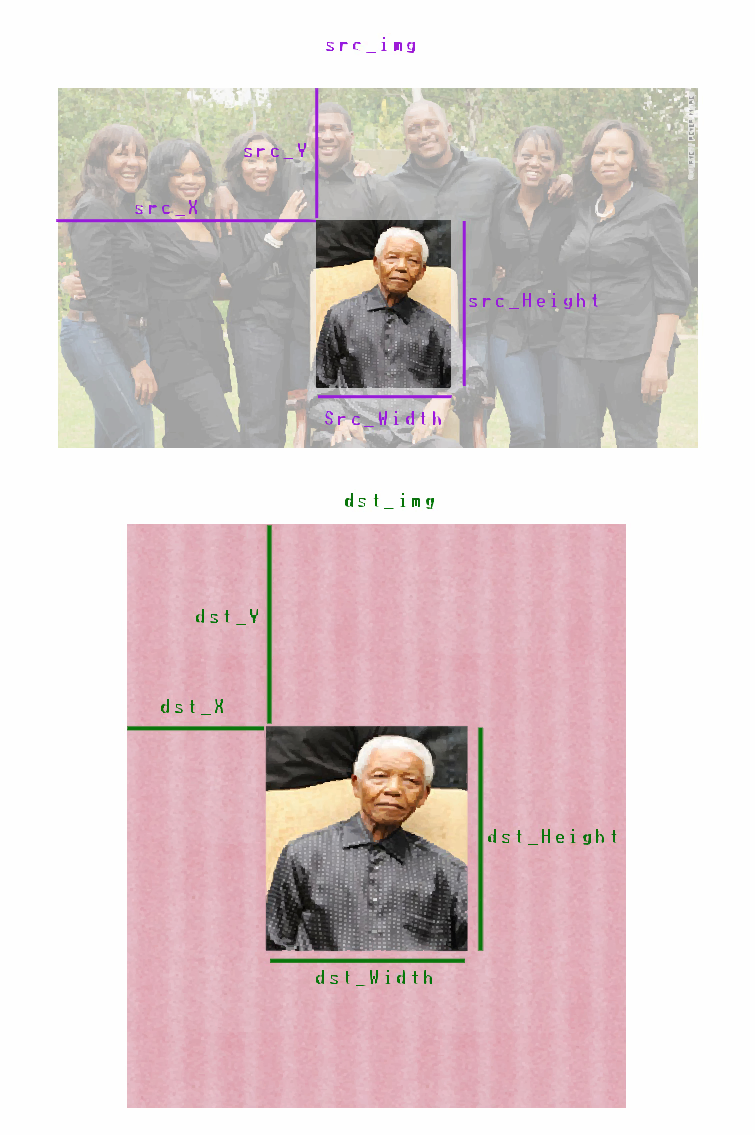
To scale the whole source image into the whole destination (no cropping):
$src_x = $src_y = $dst_x = $dst_y = 0;
$dst_width = $width;// width of new image
$dst_height = $height; //height of new image
$src_width = imagesx($src_img); //width of initial image
$src_height = imagesy($src_img); //height of initial image
Found a mistake? Have a question or improvement idea?
Let me know.
Table Of Contents