Using jsonb operators
suggest changeCreating a DB and a Table
DROP DATABASE IF EXISTS books_db;
CREATE DATABASE books_db WITH ENCODING='UTF8' TEMPLATE template0;

DROP TABLE IF EXISTS books;

CREATE TABLE books (
  id SERIAL PRIMARY KEY,
  client TEXT NOT NULL,
  data jsonb NOT NULL
);
Populating the DB
INSERT INTO books(client, data) values (
    'Joe',
    '{ "title": "Siddhartha", "author": { "first_name": "Herman", "last_name": "Hesse" } }'
),(
    'Jenny',
    '{ "title": "Dharma Bums", "author": { "first_name": "Jack", "last_name": "Kerouac" } }'
),(
    'Jenny',
    '{ "title": "100 años de soledad", "author": { "first_name": "Gabo", "last_name": "Marquéz" } }'
);
Let's see everything inside the table books. CREATE DATABASE does not connect you to the new database; run the table statements while connected to books_db.
SELECT * FROM books;
Output:

-> operator returns values out of JSON columns
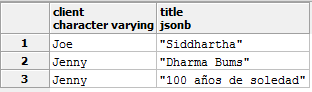
Selecting 1 column:
SELECT client,
    data->'title' AS title
    FROM books;
Output:
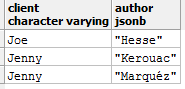
Selecting 2 columns:
SELECT client,
   data->'title' AS title, data->'author' AS author
   FROM books;
Output:

-> vs ->>
The -> operator returns the original JSON type (which might be an object), whereas ->> returns text.
Return NESTED objects
You can use -> to return a nested object and thus chain the operators:
SELECT client,
   data->'author'->'last_name' AS author
   FROM books;
Output:
Filtering
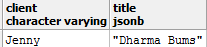
Select rows based on a value inside your JSON:
SELECT
client,
data->'title' AS title
FROM books
 WHERE data->'title' = '"Dharma Bums"';
Notice WHERE uses -> so we must compare to JSON '"Dharma Bums"'
Or we could use ->> and compare to 'Dharma Bums'
Output:
Nested filtering
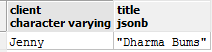
Find rows based on the value of a nested JSON object:
SELECT
 client,
 data->'title' AS title
 FROM books
  WHERE data->'author'->>'last_name' = 'Kerouac';
Output:
A real world example
CREATE TABLE events (
  name varchar(200),
  visitor_id varchar(200),
  properties json,
  browser json
);
We’re going to store events in this table, like pageviews. Each event has properties, which could be anything (e.g. current page) and also sends information about the browser (like OS, screen resolution, etc). Both of these are completely free form and could change over time (as we think of extra stuff to track).
INSERT INTO events (name, visitor_id, properties, browser) VALUES
(
  'pageview', '1',
  '{ "page": "/" }',
  '{ "name": "Chrome", "os": "Mac", "resolution": { "x": 1440, "y": 900 } }'
),(
  'pageview', '2',
  '{ "page": "/" }',
  '{ "name": "Firefox", "os": "Windows", "resolution": { "x": 1920, "y": 1200 } }'
),(
  'pageview', '1',
  '{ "page": "/account" }',
  '{ "name": "Chrome", "os": "Mac", "resolution": { "x": 1440, "y": 900 } }'
),(
  'purchase', '5',
  '{ "amount": 10 }',
  '{ "name": "Firefox", "os": "Windows", "resolution": { "x": 1024, "y": 768 } }'
),(
  'purchase', '15',
  '{ "amount": 200 }',
  '{ "name": "Firefox", "os": "Windows", "resolution": { "x": 1280, "y": 800 } }'
),(
  'purchase', '15',
  '{ "amount": 500 }',
  '{ "name": "Firefox", "os": "Windows", "resolution": { "x": 1280, "y": 800 } }'
);
Now let's select everything:
SELECT * FROM events;
Output:

JSON operators + PostgreSQL aggregate functions
Using the JSON operators, combined with traditional PostgreSQL aggregate functions, we can pull out whatever we want. You have the full might of an RDBMS at your disposal.
- Let's see browser usage:
SELECT browser->>'name' AS browser,
  count(browser)
  FROM events
  GROUP BY browser->>'name';
Output:

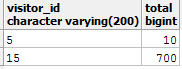
- Total revenue per visitor:
SELECT visitor_id, SUM(CAST(properties->>'amount' AS integer)) AS total
    FROM events
    WHERE CAST(properties->>'amount' AS integer) > 0
    GROUP BY visitor_id;
Output:
- Average screen resolution
SELECT AVG(CAST(browser->'resolution'->>'x' AS integer)) AS width,
  AVG(CAST(browser->'resolution'->>'y' AS integer)) AS height
FROM events;
Output:

More examples and documentation here and here.