Display file size in KB - Calculated Properties
suggest changeLet’s consider the below snippet,
Get-ChildItem -Path C:\MyFolder | Select-Object Name, CreationTime, Length
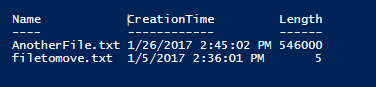
It outputs the folder contents with the selected properties, something like:
What if you want the file size in KB? This is where calculated properties come in handy. Directories often have no Length, so this is meaningful for files:
Get-ChildItem C:\MyFolder | Select-Object Name, @{Name="Size_In_KB";Expression={$_.Length / 1Kb}}
Which produces,
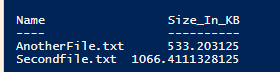
The Expression is what holds the calculation for calculated property. And yes, it can be anything!
Found a mistake? Have a question or improvement idea?
Let me know.
Table Of Contents