Custom fonts for both Android and IOS
suggest change-
Create a folder in your project folder, and add your fonts to it. Example:
-
Example: Here we added a folder in root called “mystuff”, then “fonts”, and inside it we placed our fonts:
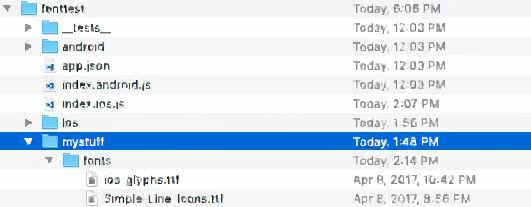
-
Add the below code in
package.json.
json { …
"rnpm": {
    "assets": [
      "path/to/fontfolder"
    ]
},

...
}
- For the example above, our package.json would now have a path of “mystuff/fonts”:
“rnpm”: {
“assets”: \[
“mystuff/fonts”
\]
\}
- Run
react-native linkcommand. - Using custom fonts on project below code ```
<Text style={{ fontFamily: 'FONT-NAME' }}>My Text</Text>
Where `FONT-NAME` is the prefix platform specific.
### Android
FONT-NAME is the words before the extension in file. Example: Your font's file name is `Roboto-Regular.ttf`, so you would set `fontFamily: Roboto-Regular`.
### iOS
FONT-NAME is "Full Name" found after right clicking, on the font file, then clicking on "Get Info". ( Source: https://stackoverflow.com/a/16788493/2529614 ), in the screenshot below, the file name is `MM Proxima Nova Ultra bold.otf`, however "Full Name" is "Proxima Nova Semibold", thus you would set `fontFamily: Proxima Nova Semibold`. Screenshot - 
* Run `react-native run-ios` or `react-native run-android` again (this will recompile with the resources)
Found a mistake? Have a question or improvement idea?
Let me know.
Table Of Contents