Setup for Linux Ubuntu
suggest change\1) Setup Node.JS
Start the terminal and run the following commands to install nodeJS:
curl -sL https://deb.nodesource.com/setup_5.x | sudo -E bash -

sudo apt-get install nodejs
If node command is unavailable
sudo ln -s /usr/bin/nodejs /usr/bin/node
Alternatives NodeJS instalations:
curl -sL https://deb.nodesource.com/setup_6.x | sudo -E bash -
sudo apt-get install -y nodejs
or
curl -sL https://deb.nodesource.com/setup_7.x | sudo -E bash -
sudo apt-get install -y nodejs
check if you have the current version
node -v
Run the npm to install the react-native
sudo npm install -g react-native-cli
\2) Setup Java
sudo apt-get install lib32stdc++6 lib32z1 openjdk-7-jdk
\3) Setup Android Studio:
Android SDK or Android Studio
http://developer.android.com/sdk/index.html
Android SDK e ENV
export ANDROID_HOME=/YOUR/LOCAL/ANDROID/SDK
export PATH=$PATH:$ANDROID_HOME/tools:$ANDROID_HOME/platform-tools
\4) Setup emulator:
On the terminal run the command
android
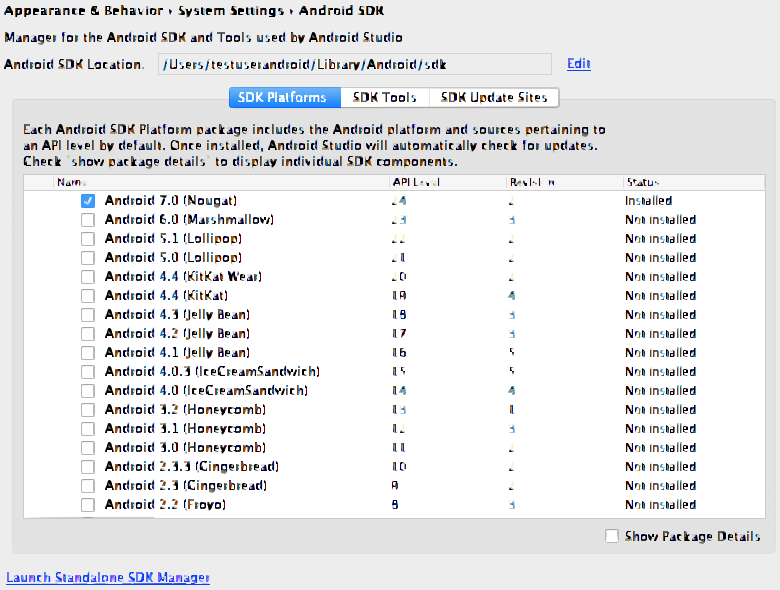
Select “SDK Platforms” from within the SDK Manager and you should see a blue checkmark next to “Android 7.0 (Nougat)”. In case it is not, click on the checkbox and then “Apply”.
\5) Start a project
Example app init
react-native init ReactNativeDemo && cd ReactNativeDemo
Obs: Always check if the version on android/app/build.gradle is the same as the Build Tools downloaded on your android SDK
android {
    compileSdkVersion XX
    buildToolsVersion "XX.X.X"
...
\6) Run the project
Open Android AVD to set up a virtual android. Execute the command line:
android avd
Follow the instructions to create a virtual device and start it
Open another terminal and run the command lines:
react-native run-android
react-native start
Found a mistake? Have a question or improvement idea?
Let me know.
Table Of Contents