Generate a Scheduled Newsletter
suggest changeCreate the Newsletter model:
rails generate model Newsletter name:string email:string
That creates app/models/newsletter.rb and a migration. The migration body is not shown here.
Create the Newsletters controller:
rails generate controller Newsletters create
Rename the generated view to a partial for the footer:
| From | To |
|---|---|
| app/views/newsletters/create.html.erb | app/views/newsletters/_form.html.erb |
The routes, form, and footer markup are not shown on this page. Add a route in config/routes.rb, render the partial from the footer, and point the form at the create action.
Install letter_opener to preview email in the browser instead of sending it. You do not need a delivery service in development, and a test send cannot reach someone else's address.
Add the gem to the development group and run bundle install:
# Gemfile
gem 'letter_opener', group: :development
Then set the delivery method in the development environment. The configuration line is not shown here; letter_opener expects:
# config/environments/development.rb
config.action_mailer.delivery_method = :letter_opener
Generate a mailer. The action name becomes the method name:
rails generate mailer UserMailer newsletter_mailer
newsletter_mailer loads the latest posts and sends one message. This assumes a Post model already exists. A comma-joined to: value is one message with several addresses, not a separate delivery per subscriber.
# app/mailers/user_mailer.rb
class UserMailer < ApplicationMailer
  def newsletter_mailer
    @newsletter = Newsletter.all
    @post = Post.last(3)
    emails = @newsletter.collect(&:email).join(", ")
    mail(from: "your_gmail_account@gmail.com", to: emails, subject: "Hi, this is a test mail.")
  end
end
The HTML template belongs in app/views/user_mailer/newsletter_mailer.html.erb. Its body is not shown here.
To send the email as a separate process, add a Rake task under lib/tasks. The task body is not shown here. task send_digest_email: :environment loads the Rails environment first, so the task can use application classes such as UserMailer.
rake -T lists the task. The page refers to it as:
rake weekly_newsletter_email
The task name in that command does not match send_digest_email. Use the name you defined.
Schedule it with the whenever gem, which writes cron jobs:
# Gemfile
gem 'whenever', require: false
Create config/schedule.rb (the config folder is already present):
wheneverize .

  [add] writing `./config/schedule.rb'
  [done] wheneverized!
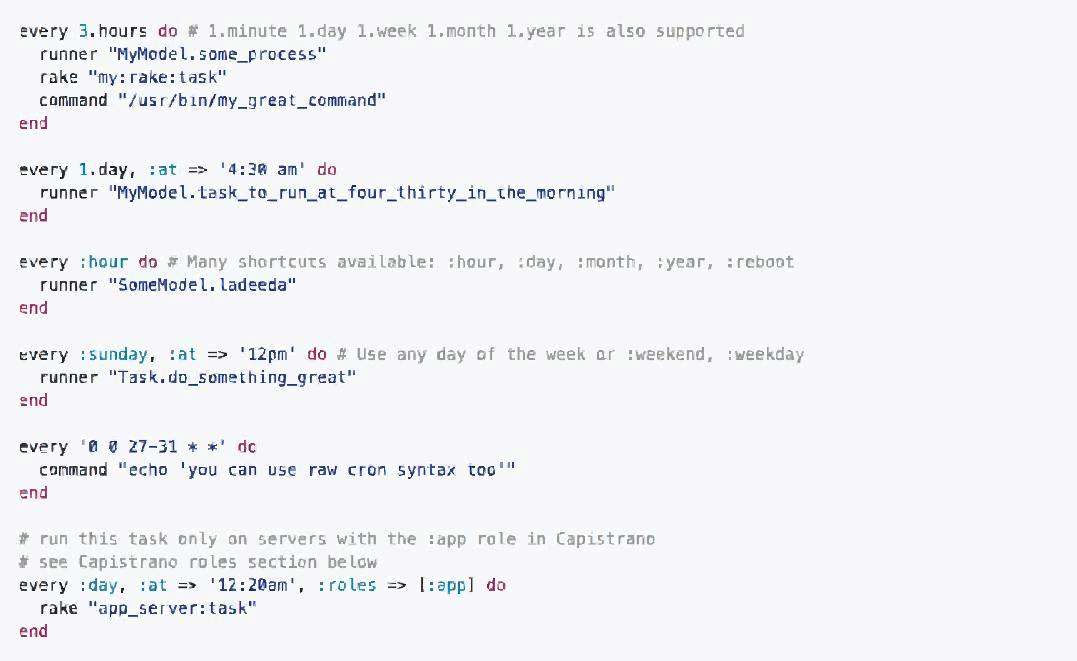
Call the Rake task from the schedule. See the whenever syntax.
# config/schedule.rb
every 1.day, at: '4:30 am' do
  rake 'weekly_newsletter_email'
end
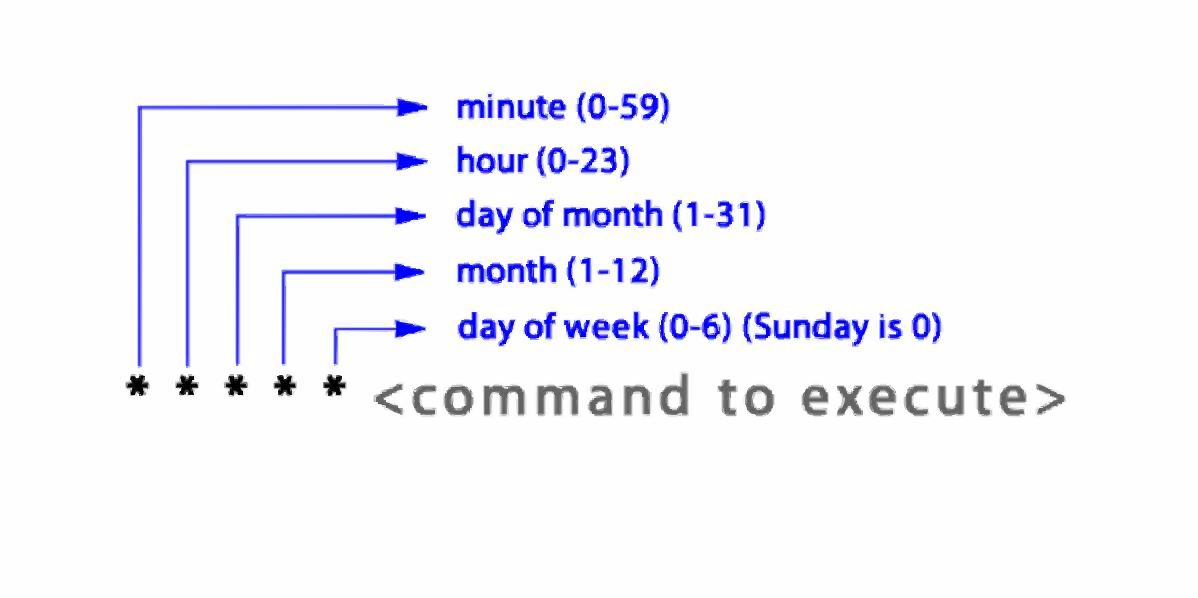
Cron job syntax:
Cron jobs with whenever:
Read the generated cron line with:
$ whenever
30 4 * * * rake weekly_newsletter_email --silent
The page also tells you to set a line in config/application.rb so the app can find its models, and to require whenever/capistrano for Capistrano 3, then set the application name and Rails environment in config/deploy.rb. Those file bodies are not shown here.
After you save the changes, deploy:
cap production deploy
The cron job is then installed on the server and runs the mailer on the schedule above.