CREATE TABLE With FOREIGN KEY
suggest changeBelow is the table Employees with a reference to the table Cities. IDENTITY is SQL Server syntax.
CREATE TABLE Cities(
    CityID INT IDENTITY(1,1) NOT NULL PRIMARY KEY,
    Name VARCHAR(20) NOT NULL,
    Zip VARCHAR(10) NOT NULL
);

CREATE TABLE Employees(
    EmployeeID INT IDENTITY (1,1) NOT NULL,
    FirstName VARCHAR(20) NOT NULL,
    LastName VARCHAR(20) NOT NULL,
    PhoneNumber VARCHAR(10) NOT NULL,
    CityID INT FOREIGN KEY REFERENCES Cities(CityID)
);
Here is a database diagram.
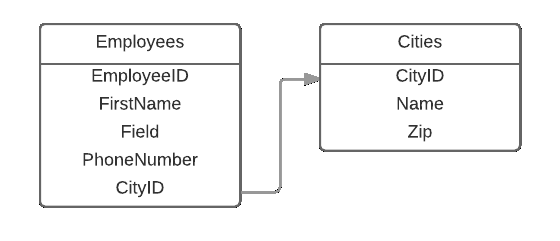
The column CityID of table Employees references the column CityID of table Cities. The syntax is:
CityID INT FOREIGN KEY REFERENCES Cities(CityID)
| Value | Meaning |
|---|---|
CityID |
Name of the column |
INT |
Type of the column |
FOREIGN KEY |
Makes the foreign key (optional in this inline form) |
REFERENCES Cities(CityID) |
References the table Cities, column CityID |
Important: You cannot reference a table that does not exist. Create Cities first, then Employees. Doing it vice versa throws an error. The referenced column must be a primary key or a unique key.
Found a mistake? Have a question or improvement idea?
Let me know.
Table Of Contents